Does Idaho Have Preference Points? Idaho Draw System 2027
ElkIdahoDraw Odds
14 min read·Sep 10, 2026·TAGZ
Does Idaho Have Preference Points? Idaho Draw System 2027

Idaho doesn't use preference points or bonus points for controlled hunts. Every applicant enters the same random drawing regardless of how many times they've applied before. A first-time hunter can draw the same tag as someone who has been applying for a decade, though that doesn't make difficult tags easy to draw. Instead of asking "How many points do I need?", focus on historical draw odds, applicant trends, and tag quotas for the specific controlled hunt you want.

Idaho's Random Controlled-Hunt System

Idaho operates a fundamentally different draw system from states like Colorado, Nevada, or Wyoming. There is no point bank to build. Unsuccessful applications don't generate points for future years, and you can't purchase a point to improve your position. Each year creates a new opportunity through Idaho's random controlled-hunt drawing.

That structure eliminates the decades-long wait found in preference-point states. It also means your unsuccessful history doesn't provide the type of priority other Western states offer. After 10 unsuccessful applications, you're still competing on equal footing with a first-time applicant.

Controlled-Hunt Species

Idaho uses controlled-hunt drawings for elk, deer, pronghorn, moose, bighorn sheep, and mountain goat. Other species and specialized opportunities can also involve controlled hunts. Application periods, eligibility requirements, tag allocations, and restrictions differ by species. Always research the rules for the exact hunt you're considering.

Application Periods for 2027

Idaho uses separate application windows. Under the current schedule, moose, bighorn sheep, and mountain goat applications run April 1–30. Deer, elk, and pronghorn applications run May 1–June 5. Other controlled species can have different periods. Verify official 2027 dates with Idaho Fish and Game once regulations are published. Don't assume dates will remain unchanged.

Elk Controlled Hunts

Idaho elk controlled hunts don't require points because there are no points. Hunters frequently search for Idaho elk point requirements, but the question doesn't apply. What matters is the drawing probability for the specific controlled hunt you're applying for. A highly desirable controlled elk hunt can still have extremely difficult odds because many hunters may compete for relatively few tags. Another applicant doesn't automatically receive priority because they've been applying longer.
Draw odds
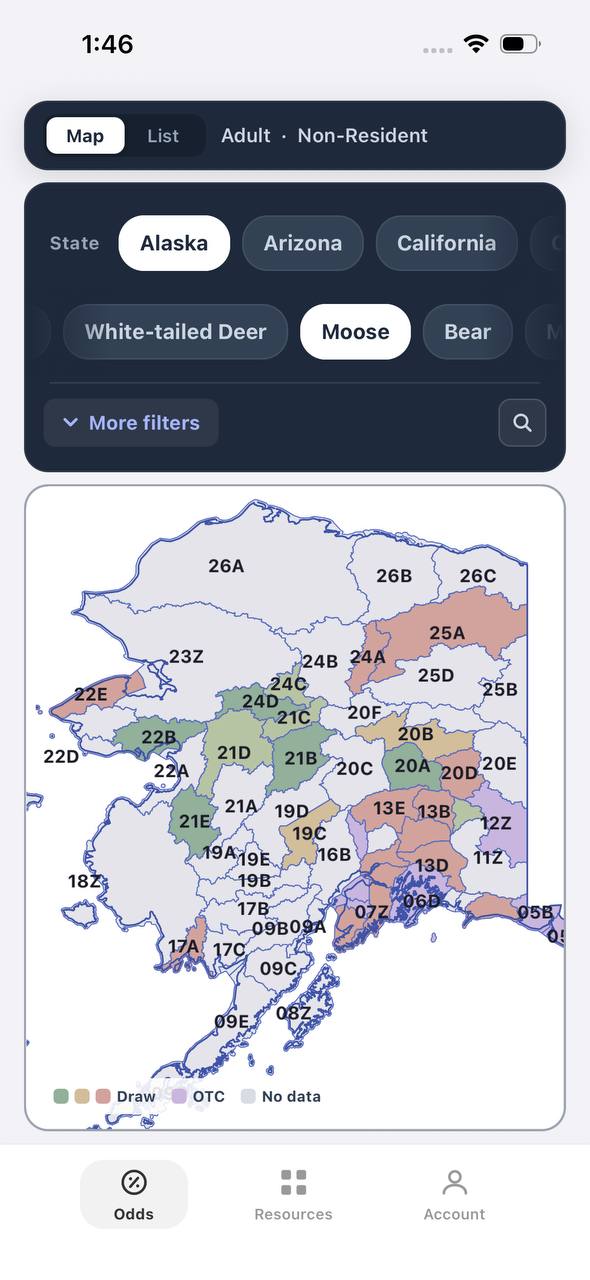
Alaska moose draw odds by unit, colored by draw, OTC, or no data
AdultNonresident

Alaska · Moose

Draw, OTC, and no-data units across the whole state.

Adult, Nonresident, Moose, no additional filters. Every unit is colored by its best matching draw odds; if nothing draws, it shows OTC; if neither, no data.

  • Alaska mixes draw and OTC moose hunts within the same region.
  • Green units are worth an application; purple units are OTC.
  • Filters stay applied when a unit is opened for hunt detail.
Draw odds
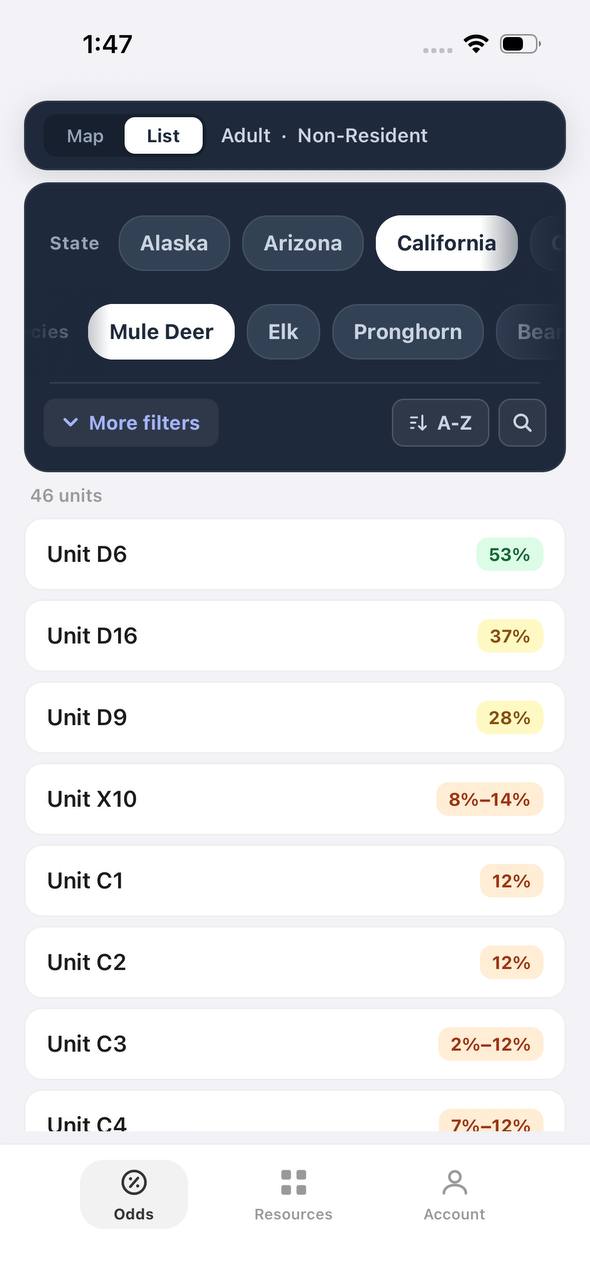
California mule deer draw odds ranked by unit in a list
AdultNonresident

California · Mule deer

Nonresident odds ranked unit by unit.

Adult, Nonresident, Mule deer, no weapon or season chip, so every matching hunt in a zone is combined into one badge and sorted by best projected odds.

  • D6 leads the list; a range like 8%–14% means more than one hunt code exists in that zone.
  • The list and the map read the same filtered hunt set.
  • 46 units are shown for this species and state alone.

Free to join

Download mobile app

  • Detailed draw odds
  • Point tracking
  • Deadline reminders
  • 19 states covered
Download on the App StoreGet it on Google Play
Unit detail
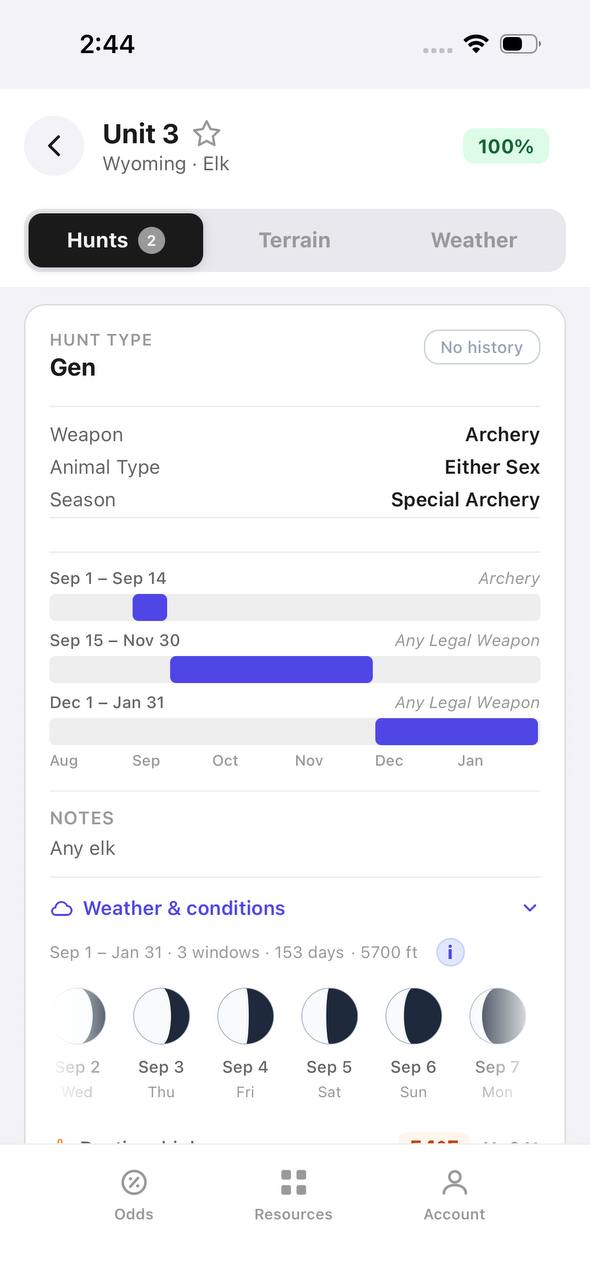
Wyoming elk unit detail, hunts tab, showing hunt windows on a timeline

Wyoming · Elk, Unit 3

Every hunt window inside one unit, laid out on a timeline.

Unit 3 has two hunt codes for elk. Each one shows its weapon, animal type, and season as a bar on a shared Aug–Jan timeline, plus a day-by-day moon phase strip.

  • Archery, then a long Any Legal Weapon window, then a late season — three opportunities in one unit.
  • The 100% badge at top means no real draw competition for the selected filters right now.
  • Weather & conditions expands below the hunt list without leaving the unit.
Terrain data
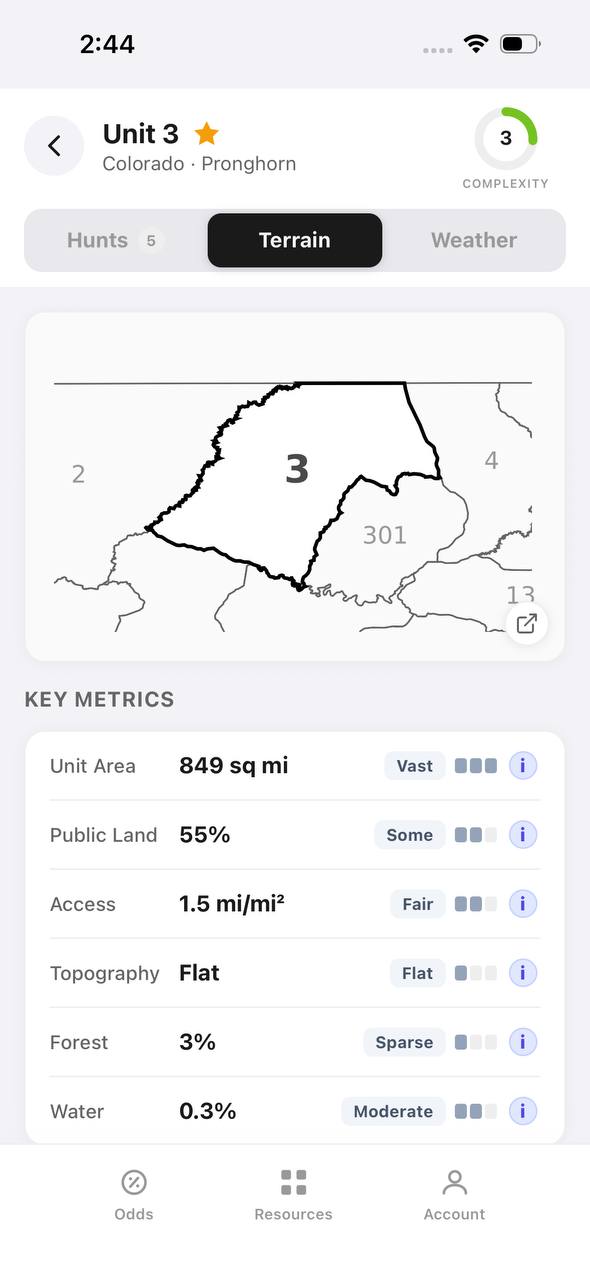
Colorado pronghorn unit detail, terrain tab, showing unit outline and key metrics

Colorado · Pronghorn, Unit 3

Unit boundaries and a complexity score at a glance.

The Terrain tab draws the unit outline against its neighbors and scores it for complexity, then breaks out area, public land, access, topography, forest, and water.

  • 849 sq mi, 55% public land, and flat topography make this a fairly approachable unit.
  • Each metric carries a short rating word — Vast, Some, Fair, Flat, Sparse, Moderate — with a tooltip.
  • The outline map shows adjacent units 2, 4, 13, and 301 for context.
State profiles
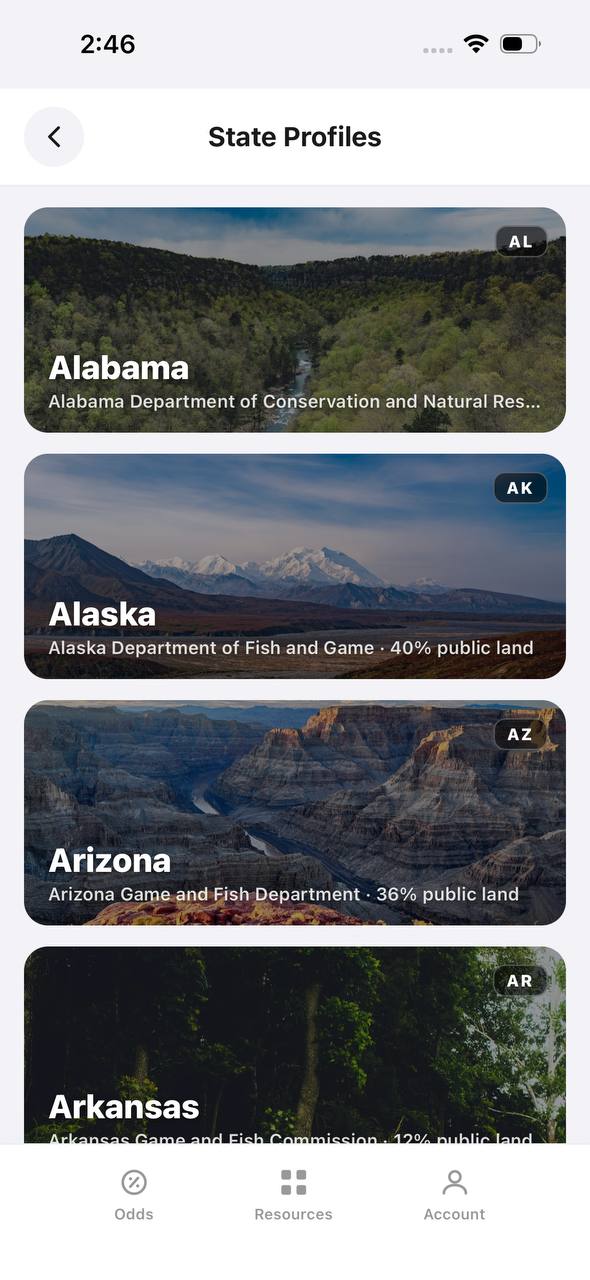
State Profiles screen listing states with wildlife agency and public land percentage

State Profiles

Each state's wildlife agency and public land share, at a glance.

State Profiles lists every covered state as a photo card naming its wildlife agency and, where available, its public land percentage.

  • Public land percentage shows right in the list, before opening the state.
  • Each card names the exact agency the regulations come from.
  • States without a public land figure yet, like Alabama here, are still listed.
Points wallet
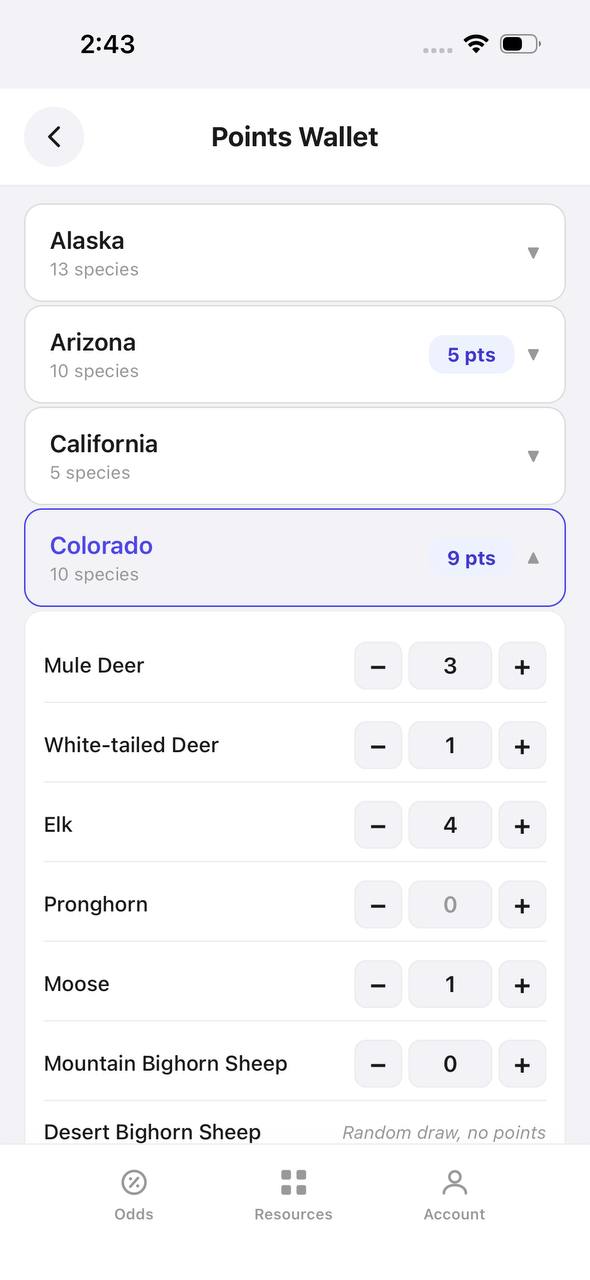
Points Wallet screen with Colorado expanded, showing a point stepper per species

Points Wallet · Colorado

Every state and species point balance in one wallet.

Points Wallet lists each state with a species count; expanding a state, like Colorado here, shows a stepper for every species so a balance can be entered or adjusted directly.

  • Colorado alone tracks points across 10 species independently.
  • Species with no points, like Pronghorn here, still show a zero to stay visible.
  • Desert Bighorn Sheep is flagged as a random draw with no points system.

Free to join

Download mobile app

  • Detailed draw odds
  • Point tracking
  • Deadline reminders
  • 19 states covered
Download on the App StoreGet it on Google Play
Draw odds
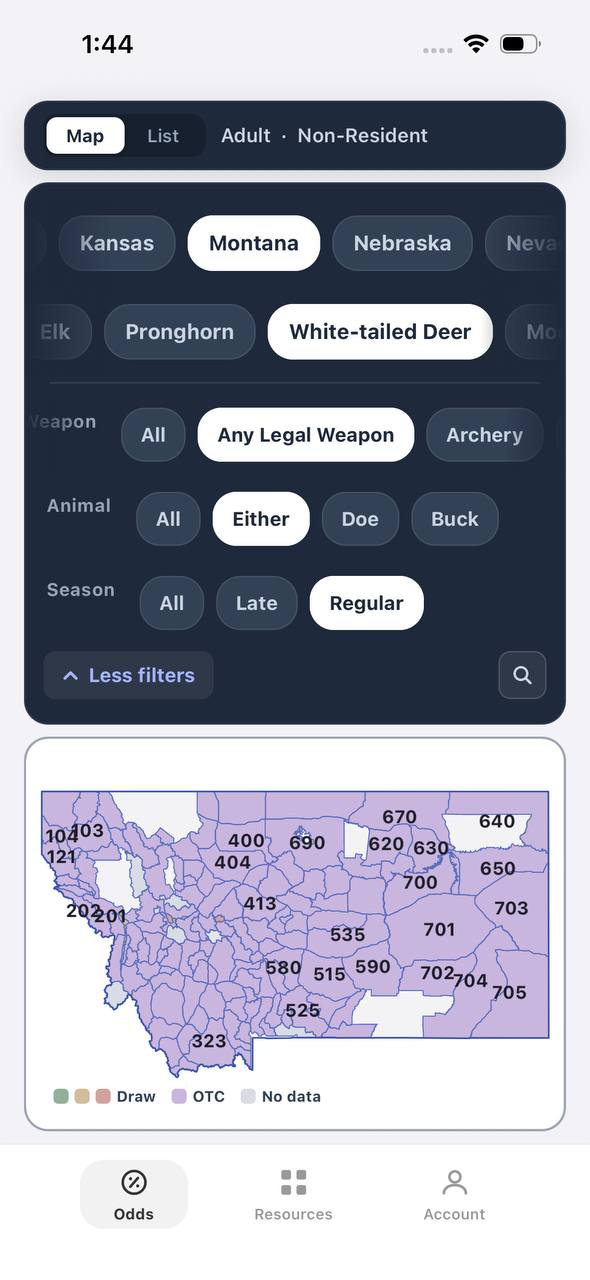
Montana white-tailed deer draw odds filtered to any legal weapon, either sex, regular season
AdultNonresidentAny Legal WeaponEitherRegular

Montana · White-tailed deer

Nearly the whole state is OTC for this filter combination.

Adult, Nonresident, White-tailed deer, filtered to Any Legal Weapon, Either, Regular. Under this combination almost every unit turns purple — over the counter.

  • Switching weapon, sex, or season changes the picture completely.
  • Purple means the tag can be bought directly, no draw.
  • This is the tag-and-go read of Montana whitetail, not the point-based one.
Terrain data
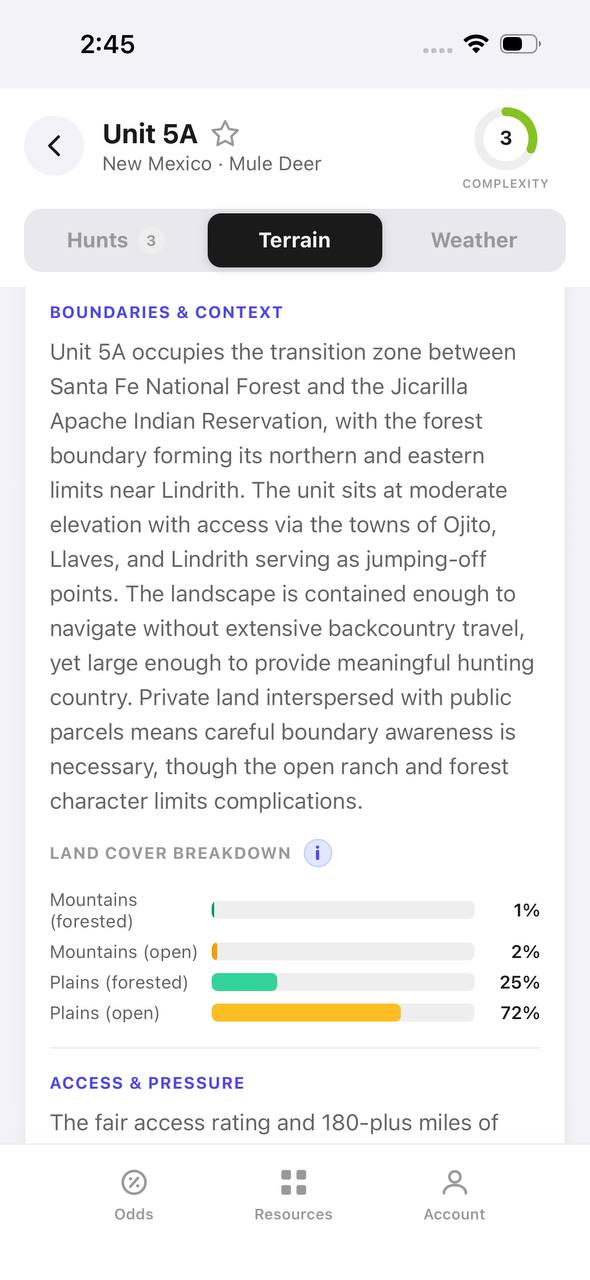
New Mexico mule deer unit 5A terrain tab with boundary description and land cover breakdown

New Mexico · Mule deer, Unit 5A

A written boundary description, not just a shape.

Unit 5A's terrain tab opens with a plain-language paragraph about surrounding land, access towns, and ownership mix, then a land cover breakdown by percentage.

  • 72% open plains and 25% forested plains describe the terrain at a glance.
  • The boundary text calls out the exact reservation and forest lines that define the unit.
  • Access & pressure continues below the fold with mileage detail.
Draw odds
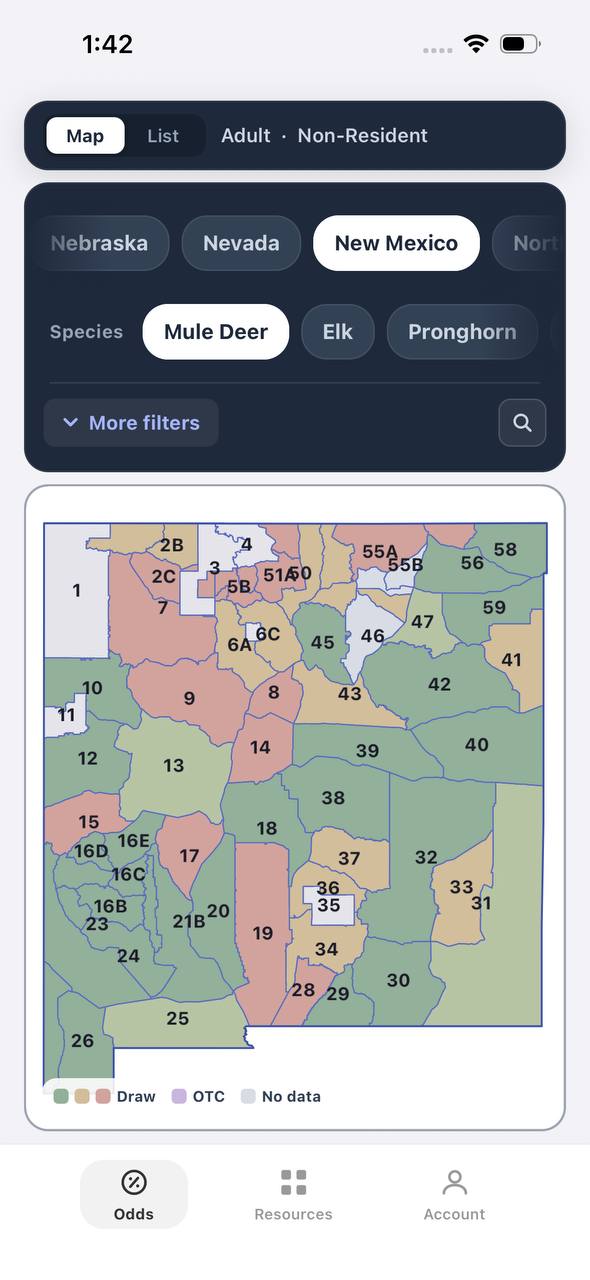
New Mexico mule deer draw odds by unit
AdultNonresident

New Mexico · Mule deer

Mule deer draw odds for every unit in the state.

Adult, Nonresident, Mule deer, all weapons and seasons. Each unit is colored by the same odds calculation used in the dashboard.

  • Green and tan together separate units worth applying to from units that are not.
  • Numbered units follow New Mexico's own game management unit boundaries.
  • Opening a unit shows the exact hunt behind the color.
Favorites
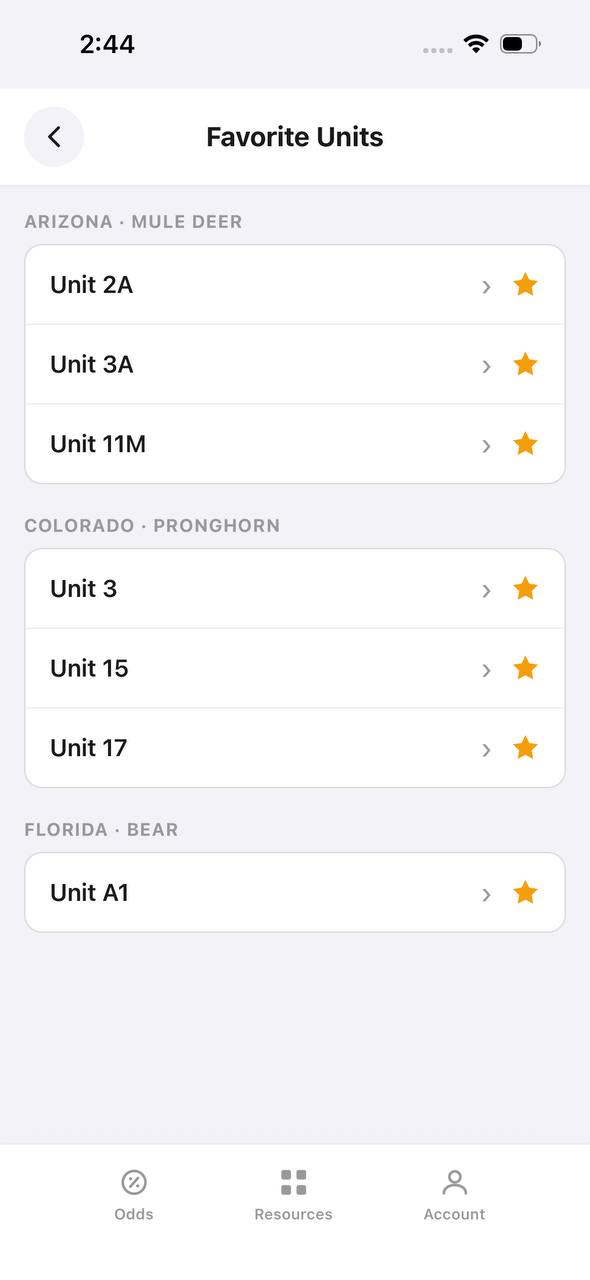
Favorite Units screen grouped by state and species

Favorite Units

Starred units from any state, grouped by species.

Favorite Units collects every starred unit across states and species into one list, grouped by state and species pair, so a saved unit is one tap away.

  • Arizona mule deer and Colorado pronghorn favorites sit side by side here.
  • Each row opens straight into that unit's detail view.
  • Unstarring from this screen removes it from the group instantly.
Deadlines
Deadline Reminders screen listing application and purchase deadlines by date

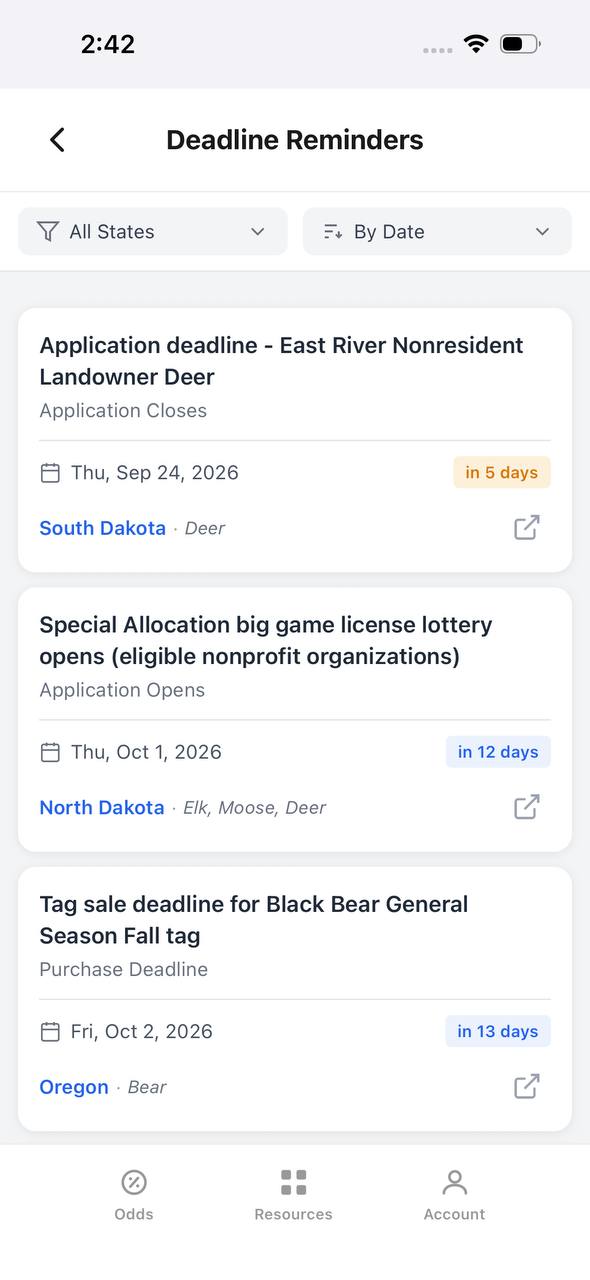
Deadline Reminders

Every application and purchase deadline, sorted by date.

Deadline Reminders filters by state and sorts by date, showing the deadline type, a countdown, and the state and species it applies to, with a link out to the source.

  • Countdown badges shift as a deadline gets close — "in 5 days" here, for example.
  • Application opens and closes are tracked as separate reminder types.
  • Each card links out to confirm the rule at the source.
Interactive map
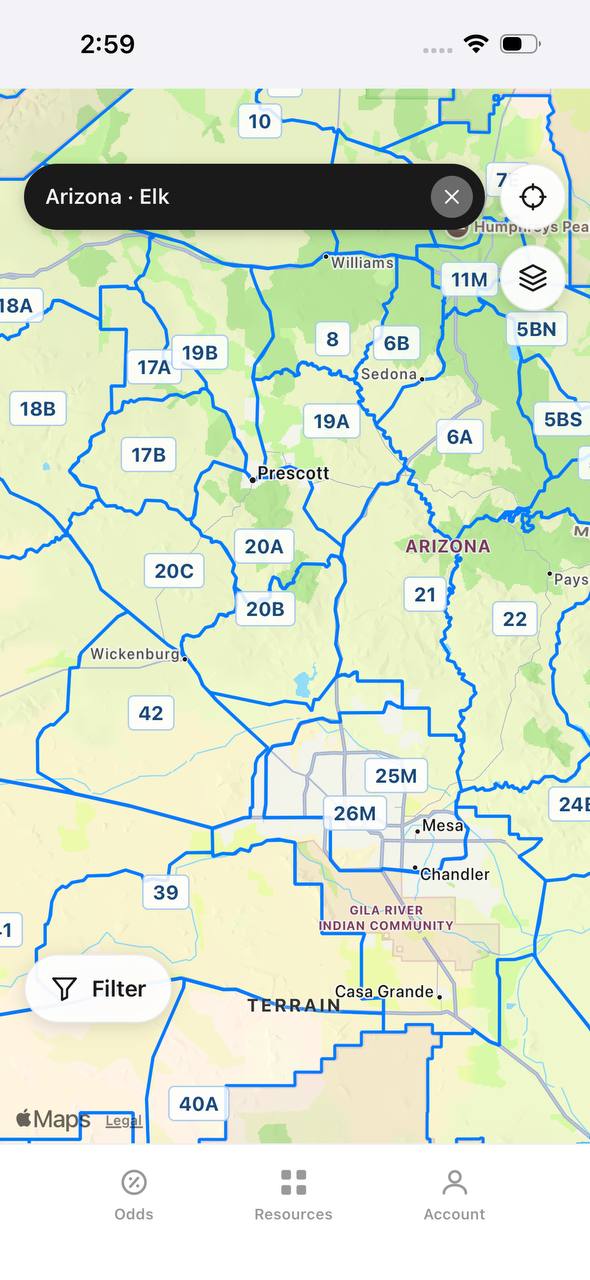
Arizona elk unit boundaries overlaid on an interactive street map

Arizona · Elk

Unit boundaries laid directly over a real map.

This view overlays Arizona elk unit boundaries and labels on top of a street map, with a search bar pinned to state and species and a layer toggle in the corner.

  • Real towns like Prescott and Sedona sit inside their unit boundaries for context.
  • A location button and layer switch float over the map, clear of the unit labels.
  • A Filter button at the bottom opens the same filters used elsewhere in the app.

Free to join

Download mobile app

  • Detailed draw odds
  • Point tracking
  • Deadline reminders
  • 19 states covered
Download on the App StoreGet it on Google Play
Insights
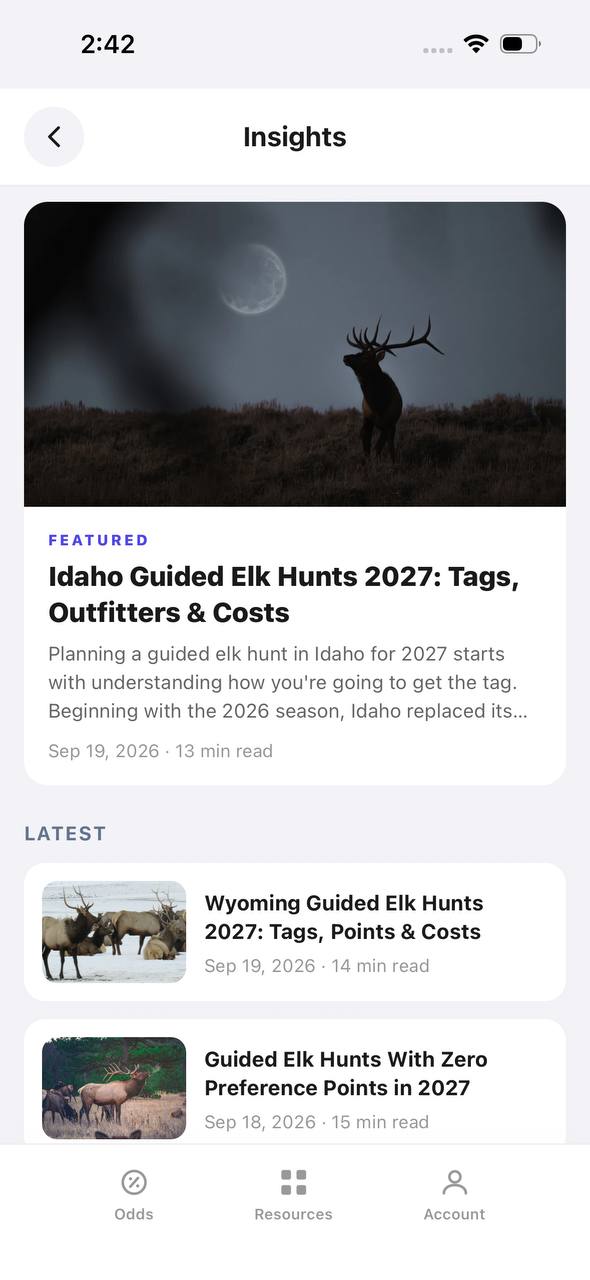
Insights screen with a featured article and a latest articles list

Insights

Hunting articles, built into the app itself.

Insights opens to a featured article with a hero image, then a Latest list of recent posts, each with a thumbnail, read time, and publish date.

  • The featured slot rotates to the newest deep-dive article.
  • Read time and publish date show on every card, not just the featured one.
  • This mirrors the blog content already published on the marketing site.
Download on the App StoreGet it on Google Play

Deer Controlled Hunts

Idaho doesn't use preference or bonus points for controlled deer hunts either. Don't ask only "How many points does Unit 44 take?" Identify the exact controlled-hunt number and research its historical drawing results. One game management unit can contain multiple controlled hunts with different hunt numbers, tag quotas, season dates, weapons, boundaries, and sex restrictions. Research the actual hunt, not just the unit number.

Moose, Goat, and Sheep Controlled Hunts

Idaho doesn't use preference points for controlled moose, mountain goat, or bighorn sheep hunts. Applications are part of Idaho's separate April application period. Because tag numbers can be extremely limited, some of these hunts can have difficult draw odds. Those odds, however, aren't determined by how many points you've accumulated. Hunters interested in these species should research the individual controlled hunts, historical drawing information, and current eligibility requirements before applying.

First-Time Applicant Opportunities

A first-time applicant can potentially draw a highly desirable elk tag, mule deer tag, moose tag, bighorn sheep tag, or mountain goat tag. There isn't a 5-point, 10-point, or 20-point threshold a new applicant must overcome first. However, random doesn't mean easy. Highly desirable Idaho controlled hunts can still receive large numbers of applications for very few tags. A first-time applicant has a chance. That doesn't mean they have a good chance.

How the Drawing Works

Idaho controlled hunts have a limited number of tags. Hunters apply for specific controlled-hunt numbers during the applicable application period. The controlled-hunt number matters because a single unit or area can contain multiple hunts with different seasons, weapons, tag quotas, boundaries, and sex restrictions. Always verify the current controlled-hunt number before applying. Don't rely on an old hunt number from a previous year's article, screenshot, or application.

Draw odds
Alaska moose draw odds by unit, colored by draw, OTC, or no data
AdultNonresident

Alaska · Moose

Draw, OTC, and no-data units across the whole state.

Adult, Nonresident, Moose, no additional filters. Every unit is colored by its best matching draw odds; if nothing draws, it shows OTC; if neither, no data.

  • Alaska mixes draw and OTC moose hunts within the same region.
  • Green units are worth an application; purple units are OTC.
  • Filters stay applied when a unit is opened for hunt detail.
Draw odds
California mule deer draw odds ranked by unit in a list
AdultNonresident

California · Mule deer

Nonresident odds ranked unit by unit.

Adult, Nonresident, Mule deer, no weapon or season chip, so every matching hunt in a zone is combined into one badge and sorted by best projected odds.

  • D6 leads the list; a range like 8%–14% means more than one hunt code exists in that zone.
  • The list and the map read the same filtered hunt set.
  • 46 units are shown for this species and state alone.

Free to join

Download mobile app

  • Detailed draw odds
  • Point tracking
  • Deadline reminders
  • 19 states covered
Download on the App StoreGet it on Google Play
Unit detail
Wyoming elk unit detail, hunts tab, showing hunt windows on a timeline

Wyoming · Elk, Unit 3

Every hunt window inside one unit, laid out on a timeline.

Unit 3 has two hunt codes for elk. Each one shows its weapon, animal type, and season as a bar on a shared Aug–Jan timeline, plus a day-by-day moon phase strip.

  • Archery, then a long Any Legal Weapon window, then a late season — three opportunities in one unit.
  • The 100% badge at top means no real draw competition for the selected filters right now.
  • Weather & conditions expands below the hunt list without leaving the unit.
Terrain data
Colorado pronghorn unit detail, terrain tab, showing unit outline and key metrics

Colorado · Pronghorn, Unit 3

Unit boundaries and a complexity score at a glance.

The Terrain tab draws the unit outline against its neighbors and scores it for complexity, then breaks out area, public land, access, topography, forest, and water.

  • 849 sq mi, 55% public land, and flat topography make this a fairly approachable unit.
  • Each metric carries a short rating word — Vast, Some, Fair, Flat, Sparse, Moderate — with a tooltip.
  • The outline map shows adjacent units 2, 4, 13, and 301 for context.
State profiles
State Profiles screen listing states with wildlife agency and public land percentage

State Profiles

Each state's wildlife agency and public land share, at a glance.

State Profiles lists every covered state as a photo card naming its wildlife agency and, where available, its public land percentage.

  • Public land percentage shows right in the list, before opening the state.
  • Each card names the exact agency the regulations come from.
  • States without a public land figure yet, like Alabama here, are still listed.
Points wallet
Points Wallet screen with Colorado expanded, showing a point stepper per species

Points Wallet · Colorado

Every state and species point balance in one wallet.

Points Wallet lists each state with a species count; expanding a state, like Colorado here, shows a stepper for every species so a balance can be entered or adjusted directly.

  • Colorado alone tracks points across 10 species independently.
  • Species with no points, like Pronghorn here, still show a zero to stay visible.
  • Desert Bighorn Sheep is flagged as a random draw with no points system.

Free to join

Download mobile app

  • Detailed draw odds
  • Point tracking
  • Deadline reminders
  • 19 states covered
Download on the App StoreGet it on Google Play
Draw odds
Montana white-tailed deer draw odds filtered to any legal weapon, either sex, regular season
AdultNonresidentAny Legal WeaponEitherRegular

Montana · White-tailed deer

Nearly the whole state is OTC for this filter combination.

Adult, Nonresident, White-tailed deer, filtered to Any Legal Weapon, Either, Regular. Under this combination almost every unit turns purple — over the counter.

  • Switching weapon, sex, or season changes the picture completely.
  • Purple means the tag can be bought directly, no draw.
  • This is the tag-and-go read of Montana whitetail, not the point-based one.
Terrain data
New Mexico mule deer unit 5A terrain tab with boundary description and land cover breakdown

New Mexico · Mule deer, Unit 5A

A written boundary description, not just a shape.

Unit 5A's terrain tab opens with a plain-language paragraph about surrounding land, access towns, and ownership mix, then a land cover breakdown by percentage.

  • 72% open plains and 25% forested plains describe the terrain at a glance.
  • The boundary text calls out the exact reservation and forest lines that define the unit.
  • Access & pressure continues below the fold with mileage detail.
Draw odds
New Mexico mule deer draw odds by unit
AdultNonresident

New Mexico · Mule deer

Mule deer draw odds for every unit in the state.

Adult, Nonresident, Mule deer, all weapons and seasons. Each unit is colored by the same odds calculation used in the dashboard.

  • Green and tan together separate units worth applying to from units that are not.
  • Numbered units follow New Mexico's own game management unit boundaries.
  • Opening a unit shows the exact hunt behind the color.
Favorites
Favorite Units screen grouped by state and species

Favorite Units

Starred units from any state, grouped by species.

Favorite Units collects every starred unit across states and species into one list, grouped by state and species pair, so a saved unit is one tap away.

  • Arizona mule deer and Colorado pronghorn favorites sit side by side here.
  • Each row opens straight into that unit's detail view.
  • Unstarring from this screen removes it from the group instantly.
Deadlines
Deadline Reminders screen listing application and purchase deadlines by date

Deadline Reminders

Every application and purchase deadline, sorted by date.

Deadline Reminders filters by state and sorts by date, showing the deadline type, a countdown, and the state and species it applies to, with a link out to the source.

  • Countdown badges shift as a deadline gets close — "in 5 days" here, for example.
  • Application opens and closes are tracked as separate reminder types.
  • Each card links out to confirm the rule at the source.
Interactive map
Arizona elk unit boundaries overlaid on an interactive street map

Arizona · Elk

Unit boundaries laid directly over a real map.

This view overlays Arizona elk unit boundaries and labels on top of a street map, with a search bar pinned to state and species and a layer toggle in the corner.

  • Real towns like Prescott and Sedona sit inside their unit boundaries for context.
  • A location button and layer switch float over the map, clear of the unit labels.
  • A Filter button at the bottom opens the same filters used elsewhere in the app.

Free to join

Download mobile app

  • Detailed draw odds
  • Point tracking
  • Deadline reminders
  • 19 states covered
Download on the App StoreGet it on Google Play
Insights
Insights screen with a featured article and a latest articles list

Insights

Hunting articles, built into the app itself.

Insights opens to a featured article with a hero image, then a Latest list of recent posts, each with a thumbnail, read time, and publish date.

  • The featured slot rotates to the newest deep-dive article.
  • Read time and publish date show on every card, not just the featured one.
  • This mirrors the blog content already published on the marketing site.
Download on the App StoreGet it on Google Play

Point Creep in Idaho

Point creep doesn't exist in the traditional sense because there are no points. However, Idaho draw odds can still get worse. Imagine a controlled elk hunt has 50 tags. One year, 500 hunters apply. A few years later, the hunt still has 50 tags, but 1,000 hunters apply. There isn't point creep, but the hunt has become substantially more competitive because application pressure increased. Idaho hunters should monitor applicant trends, tag quotas, historical draw odds, resident and nonresident participation, hunt boundaries, season dates, weapon restrictions, regulation changes, and hunt popularity.

Resident vs. Nonresident Draw Odds

Residents and nonresidents don't accumulate separate point totals because there are no points. However, residency can still significantly affect actual drawing opportunity. Idaho has nonresident allocation restrictions within controlled hunts, and the rules can differ depending on the species and hunt structure. Moose, bighorn sheep, and mountain goat, for example, have specific nonresident limitations. Nonresident hunters shouldn't simply divide total tags by total applicants and assume the resulting percentage represents their exact drawing probability. Whenever possible, research the historical nonresident results for the specific hunt.

Why Historical Draw Odds Matter

In a preference-point state, hunters often start with "How many points did this hunt take last year?" That question doesn't work in Idaho. Instead, ask how many tags were available, how many hunters applied, how many resident and nonresident tags were awarded, whether application pressure has increased, and whether tag quotas have changed. Historical draw odds don't guarantee what will happen in 2027. They tell you what happened in previous drawings and help identify trends.

One-Year Draw Odds

Suppose a hunt has relatively favorable odds one year. Hunters discover it. The hunt gets discussed online. Applications increase substantially the following year. The hunt didn't necessarily change. Demand changed. Looking at several years of historical drawing data is more useful than making an application decision based on a single year's percentage.

Idaho Draw Strategy

Because Idaho doesn't have points, your application strategy should focus on the hunt itself. Instead of asking "How many points does this hunt take?", ask "How many people applied, how many tags were available, and how competitive has this hunt historically been?" Then evaluate the opportunity beyond the draw odds. Consider historical draw odds, applicant trends, resident vs. nonresident results, tag quotas, changes in tag numbers, season dates, weapon restrictions, public-land availability, access, terrain, historical harvest information, hunt quality, and your personal hunting goals. A famous Idaho hunt with extremely low draw odds isn't automatically the right application for every hunter.

For more information on Western draw strategies, see Preference Points vs. Bonus Points: Understanding Every Western Draw System. Hunters comparing state-by-state systems may also find Montana Preference Points vs. Bonus Points 2027 and Nevada Bonus Point Strategy 2027: Draw Odds, Points, Applications helpful.

Draw odds
Alaska moose draw odds by unit, colored by draw, OTC, or no data
AdultNonresident

Alaska · Moose

Draw, OTC, and no-data units across the whole state.

Adult, Nonresident, Moose, no additional filters. Every unit is colored by its best matching draw odds; if nothing draws, it shows OTC; if neither, no data.

  • Alaska mixes draw and OTC moose hunts within the same region.
  • Green units are worth an application; purple units are OTC.
  • Filters stay applied when a unit is opened for hunt detail.
Draw odds
California mule deer draw odds ranked by unit in a list
AdultNonresident

California · Mule deer

Nonresident odds ranked unit by unit.

Adult, Nonresident, Mule deer, no weapon or season chip, so every matching hunt in a zone is combined into one badge and sorted by best projected odds.

  • D6 leads the list; a range like 8%–14% means more than one hunt code exists in that zone.
  • The list and the map read the same filtered hunt set.
  • 46 units are shown for this species and state alone.

Free to join

Download mobile app

  • Detailed draw odds
  • Point tracking
  • Deadline reminders
  • 19 states covered
Download on the App StoreGet it on Google Play
Unit detail
Wyoming elk unit detail, hunts tab, showing hunt windows on a timeline

Wyoming · Elk, Unit 3

Every hunt window inside one unit, laid out on a timeline.

Unit 3 has two hunt codes for elk. Each one shows its weapon, animal type, and season as a bar on a shared Aug–Jan timeline, plus a day-by-day moon phase strip.

  • Archery, then a long Any Legal Weapon window, then a late season — three opportunities in one unit.
  • The 100% badge at top means no real draw competition for the selected filters right now.
  • Weather & conditions expands below the hunt list without leaving the unit.
Terrain data
Colorado pronghorn unit detail, terrain tab, showing unit outline and key metrics

Colorado · Pronghorn, Unit 3

Unit boundaries and a complexity score at a glance.

The Terrain tab draws the unit outline against its neighbors and scores it for complexity, then breaks out area, public land, access, topography, forest, and water.

  • 849 sq mi, 55% public land, and flat topography make this a fairly approachable unit.
  • Each metric carries a short rating word — Vast, Some, Fair, Flat, Sparse, Moderate — with a tooltip.
  • The outline map shows adjacent units 2, 4, 13, and 301 for context.
State profiles
State Profiles screen listing states with wildlife agency and public land percentage

State Profiles

Each state's wildlife agency and public land share, at a glance.

State Profiles lists every covered state as a photo card naming its wildlife agency and, where available, its public land percentage.

  • Public land percentage shows right in the list, before opening the state.
  • Each card names the exact agency the regulations come from.
  • States without a public land figure yet, like Alabama here, are still listed.
Points wallet
Points Wallet screen with Colorado expanded, showing a point stepper per species

Points Wallet · Colorado

Every state and species point balance in one wallet.

Points Wallet lists each state with a species count; expanding a state, like Colorado here, shows a stepper for every species so a balance can be entered or adjusted directly.

  • Colorado alone tracks points across 10 species independently.
  • Species with no points, like Pronghorn here, still show a zero to stay visible.
  • Desert Bighorn Sheep is flagged as a random draw with no points system.

Free to join

Download mobile app

  • Detailed draw odds
  • Point tracking
  • Deadline reminders
  • 19 states covered
Download on the App StoreGet it on Google Play
Draw odds
Montana white-tailed deer draw odds filtered to any legal weapon, either sex, regular season
AdultNonresidentAny Legal WeaponEitherRegular

Montana · White-tailed deer

Nearly the whole state is OTC for this filter combination.

Adult, Nonresident, White-tailed deer, filtered to Any Legal Weapon, Either, Regular. Under this combination almost every unit turns purple — over the counter.

  • Switching weapon, sex, or season changes the picture completely.
  • Purple means the tag can be bought directly, no draw.
  • This is the tag-and-go read of Montana whitetail, not the point-based one.
Terrain data
New Mexico mule deer unit 5A terrain tab with boundary description and land cover breakdown

New Mexico · Mule deer, Unit 5A

A written boundary description, not just a shape.

Unit 5A's terrain tab opens with a plain-language paragraph about surrounding land, access towns, and ownership mix, then a land cover breakdown by percentage.

  • 72% open plains and 25% forested plains describe the terrain at a glance.
  • The boundary text calls out the exact reservation and forest lines that define the unit.
  • Access & pressure continues below the fold with mileage detail.
Draw odds
New Mexico mule deer draw odds by unit
AdultNonresident

New Mexico · Mule deer

Mule deer draw odds for every unit in the state.

Adult, Nonresident, Mule deer, all weapons and seasons. Each unit is colored by the same odds calculation used in the dashboard.

  • Green and tan together separate units worth applying to from units that are not.
  • Numbered units follow New Mexico's own game management unit boundaries.
  • Opening a unit shows the exact hunt behind the color.
Favorites
Favorite Units screen grouped by state and species

Favorite Units

Starred units from any state, grouped by species.

Favorite Units collects every starred unit across states and species into one list, grouped by state and species pair, so a saved unit is one tap away.

  • Arizona mule deer and Colorado pronghorn favorites sit side by side here.
  • Each row opens straight into that unit's detail view.
  • Unstarring from this screen removes it from the group instantly.
Deadlines
Deadline Reminders screen listing application and purchase deadlines by date

Deadline Reminders

Every application and purchase deadline, sorted by date.

Deadline Reminders filters by state and sorts by date, showing the deadline type, a countdown, and the state and species it applies to, with a link out to the source.

  • Countdown badges shift as a deadline gets close — "in 5 days" here, for example.
  • Application opens and closes are tracked as separate reminder types.
  • Each card links out to confirm the rule at the source.
Interactive map
Arizona elk unit boundaries overlaid on an interactive street map

Arizona · Elk

Unit boundaries laid directly over a real map.

This view overlays Arizona elk unit boundaries and labels on top of a street map, with a search bar pinned to state and species and a layer toggle in the corner.

  • Real towns like Prescott and Sedona sit inside their unit boundaries for context.
  • A location button and layer switch float over the map, clear of the unit labels.
  • A Filter button at the bottom opens the same filters used elsewhere in the app.

Free to join

Download mobile app

  • Detailed draw odds
  • Point tracking
  • Deadline reminders
  • 19 states covered
Download on the App StoreGet it on Google Play
Insights
Insights screen with a featured article and a latest articles list

Insights

Hunting articles, built into the app itself.

Insights opens to a featured article with a hero image, then a Latest list of recent posts, each with a thumbnail, read time, and publish date.

  • The featured slot rotates to the newest deep-dive article.
  • Read time and publish date show on every card, not just the featured one.
  • This mirrors the blog content already published on the marketing site.
Download on the App StoreGet it on Google Play

General Tags vs. Controlled Hunts

Controlled hunts aren't the only way to hunt big game in Idaho. Idaho also has general hunting opportunities for species such as deer and elk. However, general doesn't necessarily mean unlimited or automatically available, particularly for nonresidents. Tag quotas, residency rules, elk-zone structures, licensing procedures, and other restrictions can apply. This distinction became even more important after Idaho changed the distribution system for nonresident general-season deer and elk tags beginning with the 2026 season. Don't confuse general-season tag distribution with controlled-hunt drawings. They're separate systems.

Second Controlled-Hunt Drawing

Idaho can conduct a second drawing when controlled-hunt tags remain after the first drawing. Under the current schedule, the second application period for certain remaining controlled hunts, including deer and elk, is August 5–15. Tags can become available because they weren't allocated during the first drawing or because successful applicants failed to purchase them. Don't assume premium hunts will be available. The inventory depends entirely on what remains in a particular year.

Super Hunt

Idaho's Super Hunt is a separate drawing. It shouldn't be confused with Idaho's normal controlled-hunt drawing, and Super Hunt entries do not create preference or bonus points for the standard controlled-hunt system. Hunters researching Super Hunt should treat it as its own opportunity with separate rules, entry periods, and drawing procedures.

2027 Idaho Draw Strategy

Idaho's lack of preference and bonus points creates a very different strategy from states such as Colorado, Utah, Nevada, or Arizona. You don't need to spend years building a point total before becoming eligible to compete for a desirable controlled hunt. Instead, your strategy should focus on four questions. How competitive is the hunt? Look at multiple years of applications, tags, and historical draw results. Don't rely on one season. Is applicant demand increasing? A hunt can become harder to draw even when the tag quota doesn't change. Watch applicant trends. Has the tag quota changed? A reduction in tags can materially change the following year's draw probability. Is the hunt actually right for you? Draw odds are only part of the decision. Also research season dates, access, public land, terrain, weapon restrictions, harvest information, and the hunting experience itself.

Draw odds
Alaska moose draw odds by unit, colored by draw, OTC, or no data
AdultNonresident

Alaska · Moose

Draw, OTC, and no-data units across the whole state.

Adult, Nonresident, Moose, no additional filters. Every unit is colored by its best matching draw odds; if nothing draws, it shows OTC; if neither, no data.

  • Alaska mixes draw and OTC moose hunts within the same region.
  • Green units are worth an application; purple units are OTC.
  • Filters stay applied when a unit is opened for hunt detail.
Draw odds
California mule deer draw odds ranked by unit in a list
AdultNonresident

California · Mule deer

Nonresident odds ranked unit by unit.

Adult, Nonresident, Mule deer, no weapon or season chip, so every matching hunt in a zone is combined into one badge and sorted by best projected odds.

  • D6 leads the list; a range like 8%–14% means more than one hunt code exists in that zone.
  • The list and the map read the same filtered hunt set.
  • 46 units are shown for this species and state alone.

Free to join

Download mobile app

  • Detailed draw odds
  • Point tracking
  • Deadline reminders
  • 19 states covered
Download on the App StoreGet it on Google Play
Unit detail
Wyoming elk unit detail, hunts tab, showing hunt windows on a timeline

Wyoming · Elk, Unit 3

Every hunt window inside one unit, laid out on a timeline.

Unit 3 has two hunt codes for elk. Each one shows its weapon, animal type, and season as a bar on a shared Aug–Jan timeline, plus a day-by-day moon phase strip.

  • Archery, then a long Any Legal Weapon window, then a late season — three opportunities in one unit.
  • The 100% badge at top means no real draw competition for the selected filters right now.
  • Weather & conditions expands below the hunt list without leaving the unit.
Terrain data
Colorado pronghorn unit detail, terrain tab, showing unit outline and key metrics

Colorado · Pronghorn, Unit 3

Unit boundaries and a complexity score at a glance.

The Terrain tab draws the unit outline against its neighbors and scores it for complexity, then breaks out area, public land, access, topography, forest, and water.

  • 849 sq mi, 55% public land, and flat topography make this a fairly approachable unit.
  • Each metric carries a short rating word — Vast, Some, Fair, Flat, Sparse, Moderate — with a tooltip.
  • The outline map shows adjacent units 2, 4, 13, and 301 for context.
State profiles
State Profiles screen listing states with wildlife agency and public land percentage

State Profiles

Each state's wildlife agency and public land share, at a glance.

State Profiles lists every covered state as a photo card naming its wildlife agency and, where available, its public land percentage.

  • Public land percentage shows right in the list, before opening the state.
  • Each card names the exact agency the regulations come from.
  • States without a public land figure yet, like Alabama here, are still listed.
Points wallet
Points Wallet screen with Colorado expanded, showing a point stepper per species

Points Wallet · Colorado

Every state and species point balance in one wallet.

Points Wallet lists each state with a species count; expanding a state, like Colorado here, shows a stepper for every species so a balance can be entered or adjusted directly.

  • Colorado alone tracks points across 10 species independently.
  • Species with no points, like Pronghorn here, still show a zero to stay visible.
  • Desert Bighorn Sheep is flagged as a random draw with no points system.

Free to join

Download mobile app

  • Detailed draw odds
  • Point tracking
  • Deadline reminders
  • 19 states covered
Download on the App StoreGet it on Google Play
Draw odds
Montana white-tailed deer draw odds filtered to any legal weapon, either sex, regular season
AdultNonresidentAny Legal WeaponEitherRegular

Montana · White-tailed deer

Nearly the whole state is OTC for this filter combination.

Adult, Nonresident, White-tailed deer, filtered to Any Legal Weapon, Either, Regular. Under this combination almost every unit turns purple — over the counter.

  • Switching weapon, sex, or season changes the picture completely.
  • Purple means the tag can be bought directly, no draw.
  • This is the tag-and-go read of Montana whitetail, not the point-based one.
Terrain data
New Mexico mule deer unit 5A terrain tab with boundary description and land cover breakdown

New Mexico · Mule deer, Unit 5A

A written boundary description, not just a shape.

Unit 5A's terrain tab opens with a plain-language paragraph about surrounding land, access towns, and ownership mix, then a land cover breakdown by percentage.

  • 72% open plains and 25% forested plains describe the terrain at a glance.
  • The boundary text calls out the exact reservation and forest lines that define the unit.
  • Access & pressure continues below the fold with mileage detail.
Draw odds
New Mexico mule deer draw odds by unit
AdultNonresident

New Mexico · Mule deer

Mule deer draw odds for every unit in the state.

Adult, Nonresident, Mule deer, all weapons and seasons. Each unit is colored by the same odds calculation used in the dashboard.

  • Green and tan together separate units worth applying to from units that are not.
  • Numbered units follow New Mexico's own game management unit boundaries.
  • Opening a unit shows the exact hunt behind the color.
Favorites
Favorite Units screen grouped by state and species

Favorite Units

Starred units from any state, grouped by species.

Favorite Units collects every starred unit across states and species into one list, grouped by state and species pair, so a saved unit is one tap away.

  • Arizona mule deer and Colorado pronghorn favorites sit side by side here.
  • Each row opens straight into that unit's detail view.
  • Unstarring from this screen removes it from the group instantly.
Deadlines
Deadline Reminders screen listing application and purchase deadlines by date

Deadline Reminders

Every application and purchase deadline, sorted by date.

Deadline Reminders filters by state and sorts by date, showing the deadline type, a countdown, and the state and species it applies to, with a link out to the source.

  • Countdown badges shift as a deadline gets close — "in 5 days" here, for example.
  • Application opens and closes are tracked as separate reminder types.
  • Each card links out to confirm the rule at the source.
Interactive map
Arizona elk unit boundaries overlaid on an interactive street map

Arizona · Elk

Unit boundaries laid directly over a real map.

This view overlays Arizona elk unit boundaries and labels on top of a street map, with a search bar pinned to state and species and a layer toggle in the corner.

  • Real towns like Prescott and Sedona sit inside their unit boundaries for context.
  • A location button and layer switch float over the map, clear of the unit labels.
  • A Filter button at the bottom opens the same filters used elsewhere in the app.

Free to join

Download mobile app

  • Detailed draw odds
  • Point tracking
  • Deadline reminders
  • 19 states covered
Download on the App StoreGet it on Google Play
Insights
Insights screen with a featured article and a latest articles list

Insights

Hunting articles, built into the app itself.

Insights opens to a featured article with a hero image, then a Latest list of recent posts, each with a thumbnail, read time, and publish date.

  • The featured slot rotates to the newest deep-dive article.
  • Read time and publish date show on every card, not just the featured one.
  • This mirrors the blog content already published on the marketing site.
Download on the App StoreGet it on Google Play

New Applicant Advantage

For hunters who haven't spent years building points in other Western states, Idaho has one major advantage. You aren't starting behind a decades-long point bank. A first-time applicant can enter the same random controlled-hunt drawing as a hunter who has applied unsuccessfully for years. That doesn't make the tag easy to draw. It means you have a chance immediately.

Idaho Draw Difficulty

The same system creates another challenge. You can't build toward certainty. After 10 unsuccessful applications, you don't suddenly become a 10-point applicant. Your unsuccessful history doesn't provide the type of priority found in a traditional preference-point system. For difficult hunts, you may apply repeatedly without ever reaching a guaranteed draw position.

Should You Apply?

That depends on the hunt you want and the historical odds you're comfortable with. Idaho can be especially attractive to hunters who want random opportunity instead of a long-term point-building strategy. But application decisions should still be based on actual data. A 1% hunt remains a very difficult draw even when everyone enters without preference points.

Using TAGZ to Research Idaho Draw Odds

Because Idaho doesn't use preference or bonus points, historical draw information becomes particularly valuable. Instead of trying to calculate how many points a unit takes, Idaho hunters need to understand how competitive the specific controlled hunt has historically been. Use TAGZ to research Western draw opportunities and compare hunts. Explore Idaho Game Units on TAGZ to research hunting areas and opportunities across the state. Hunters planning multi-state strategies may also want to review Colorado Preference Point Strategy 2027: When to Use Your Points and California Preference Point Strategy 2027: Draw Odds, Deer, Elk, Points for comparison.

FAQ — Idaho Preference Points & Draw System

Does Idaho have preference points? No. Idaho doesn't use preference points for controlled hunts.

Does Idaho have bonus points? No. Idaho doesn't use bonus points for controlled hunts.

Can you buy Idaho hunting points? No. Idaho doesn't have a preference- or bonus-point purchase program for controlled hunts.

How many points do you need for Idaho elk? Zero. Idaho doesn't use preference or bonus points for controlled elk hunts.

Can you draw an Idaho controlled hunt with zero points? Yes. There is no preference- or bonus-point threshold because Idaho doesn't use either system for controlled hunts.

Does Idaho have point creep? Not in the traditional preference-point sense. However, draw odds can still worsen if application numbers increase or tag quotas decrease.