Alligator Meat Processing and Cooking Guide for Hunters

Alligator
9 min read·Aug 1, 2026·TAGZ
Alligator Meat Processing and Cooking Guide for Hunters

You dropped a solid gator during your hunt, and now you are standing over 200 pounds of prehistoric reptile wondering where to start. Alligator meat is lean, mild, and surprisingly versatile in the kitchen, but it requires specific processing techniques to maximize quality. This guide walks you through field care, butchering, and cooking methods that turn your harvest into meals worth remembering.

Field Care After the Shot

Proper field care starts the moment your gator is secured. Alligators have thick hides and dense muscle tissue that holds heat, so cooling the meat quickly prevents spoilage. Get the animal to a shaded area or onto ice as soon as possible.

Begin by bleeding the gator. Make a deep cut behind the head to sever major blood vessels. This step improves meat quality by reducing blood content in the muscle tissue. Once bled, keep the carcass cool and out of direct sunlight until you can begin processing.

Most hunters prefer to skin and gut alligators within a few hours of harvest. If you cannot process immediately, store the whole carcass on ice with the belly cavity opened to allow airflow. Bacteria multiply rapidly in warm conditions, and gator meat turns quickly without proper cooling.

Skinning and Initial Breakdown

Skinning an alligator requires a sharp knife and patience. The hide is toughest along the back and softer on the belly. Start by making a centerline cut from the throat to the tail along the belly. Carefully work your knife between the skin and meat, using short strokes to avoid cutting into the muscle.

The tail and jaw muscles contain the majority of usable meat. Once skinned, remove the head and separate the tail from the body. The body cavity contains organs and very little usable meat, so focus your efforts on the tail, jaw, and legs.

Rinse all meat thoroughly with cold water to remove blood, scales, and debris. Pat dry with paper towels before continuing with butchering. Clean meat is easier to work with and results in better-tasting final products.

Butchering Cuts and Meat Selection

Alligator meat breaks down into three primary cuts: tail, jaw, and legs. Each section has different textures and best uses in the kitchen.

Tail Meat

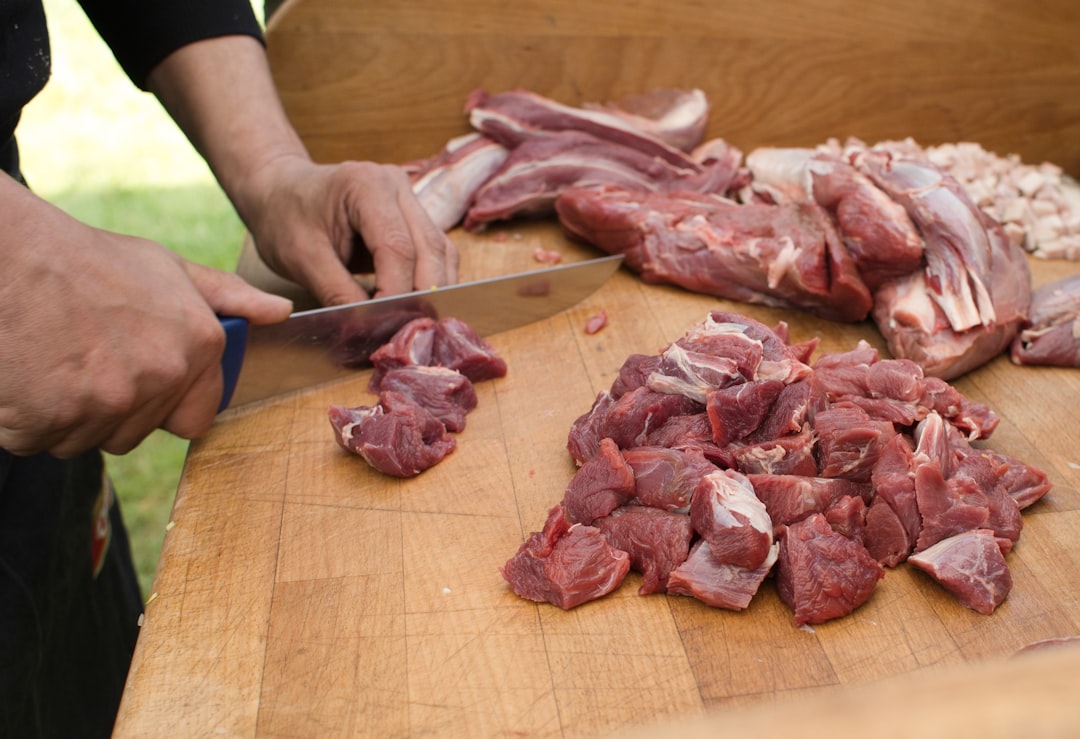
The tail contains the most prized meat. It is tender, mild, and has a texture similar to chicken or pork loin. Remove the tail from the body at the base, then fillet the meat away from the vertebrae on both sides. You will end up with two long loins that can be cut into steaks, cubed for frying, or left whole for grilling.

Tail meat is lean with very little fat. It works well for frying, grilling, or sautéing. Cut tail steaks about one inch thick for grilling or cube into bite-sized pieces for nuggets and stir-fry.

Jaw Meat

Jaw meat is darker and slightly tougher than tail meat. It requires longer cooking times or moist-heat methods to break down connective tissue. Remove the jaw meat by cutting along the bone structure and pulling away muscle groups.

Jaw meat works best in stews, gumbos, or slow-cooked dishes. The flavor is richer and gamier than tail meat. Some hunters grind jaw meat for sausage or burger, mixing it with pork fat to add moisture.

Leg Meat

Alligator legs contain small amounts of meat surrounded by bone and cartilage. The effort required to extract leg meat often outweighs the yield, but it can be worth salvaging on larger gators. Leg meat is similar in texture to jaw meat and works well in ground applications or slow-cooked recipes.

Preparation and Tenderizing Techniques

Alligator meat benefits from brining or marinating before cooking. The lean muscle tissue dries out easily, and acidic marinades help tenderize tougher cuts.

Brining

A simple saltwater brine improves moisture retention and adds subtle flavor. Mix one cup of salt per gallon of cold water and submerge meat for 2-4 hours. Rinse thoroughly after brining and pat dry before cooking.

Brining is especially useful for tail steaks destined for the grill. The added moisture prevents the meat from drying out over high heat.

Marinating

Acidic marinades tenderize tougher cuts like jaw and leg meat. Combine citrus juice, vinegar, or buttermilk with herbs and spices. Marinate for at least two hours or overnight in the refrigerator.

Popular marinade bases include Italian dressing, hot sauce and buttermilk, or lime juice with Cajun seasoning. Avoid over-marinating, which can turn the meat mushy.
Draw odds
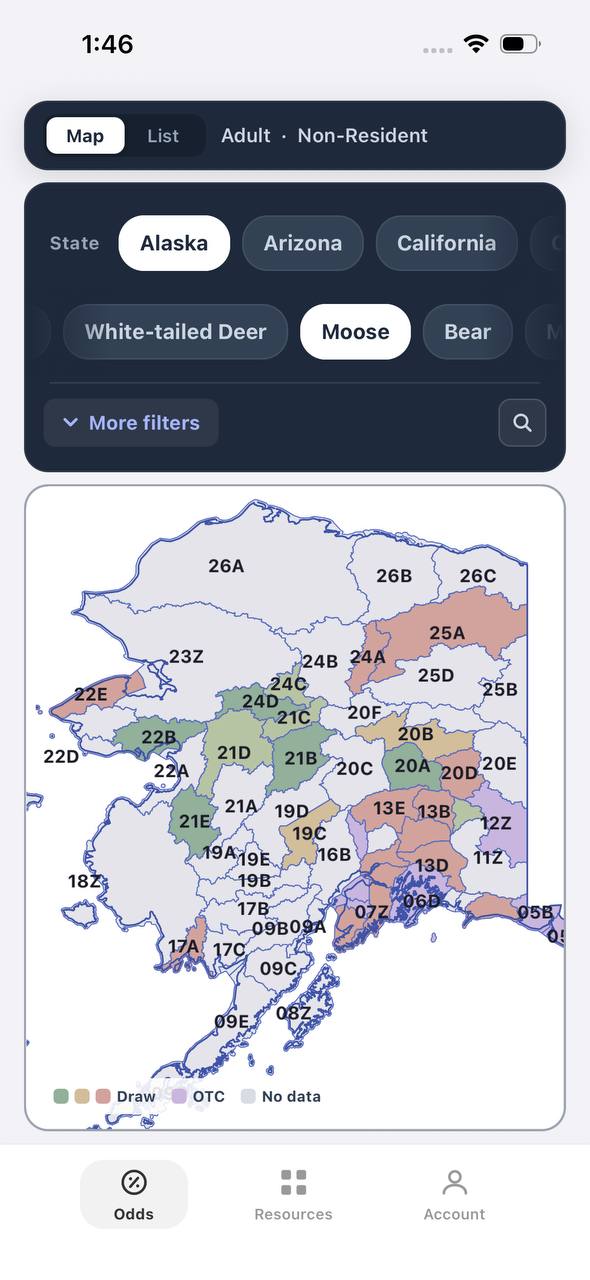
Alaska moose draw odds by unit, colored by draw, OTC, or no data
AdultNonresident

Alaska · Moose

Draw, OTC, and no-data units across the whole state.

Adult, Nonresident, Moose, no additional filters. Every unit is colored by its best matching draw odds; if nothing draws, it shows OTC; if neither, no data.

  • Alaska mixes draw and OTC moose hunts within the same region.
  • Green units are worth an application; purple units are OTC.
  • Filters stay applied when a unit is opened for hunt detail.
Draw odds
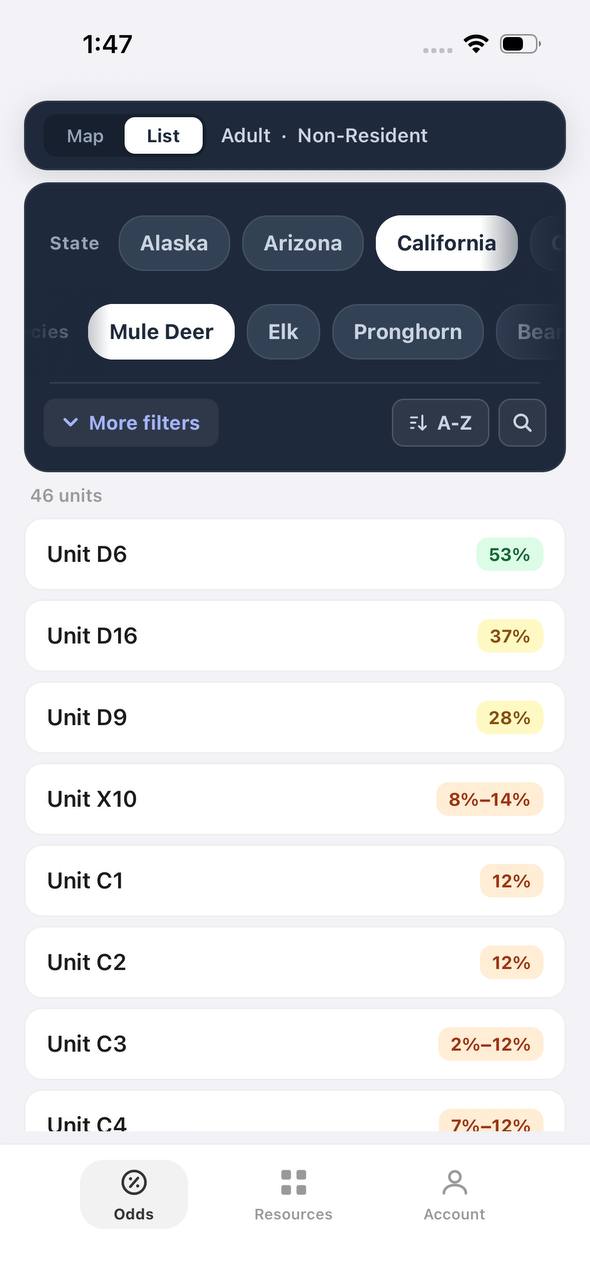
California mule deer draw odds ranked by unit in a list
AdultNonresident

California · Mule deer

Nonresident odds ranked unit by unit.

Adult, Nonresident, Mule deer, no weapon or season chip, so every matching hunt in a zone is combined into one badge and sorted by best projected odds.

  • D6 leads the list; a range like 8%–14% means more than one hunt code exists in that zone.
  • The list and the map read the same filtered hunt set.
  • 46 units are shown for this species and state alone.

Free to join

Download mobile app

  • Detailed draw odds
  • Point tracking
  • Deadline reminders
  • 18 states covered
Download on the App StoreGet it on Google Play
Unit detail
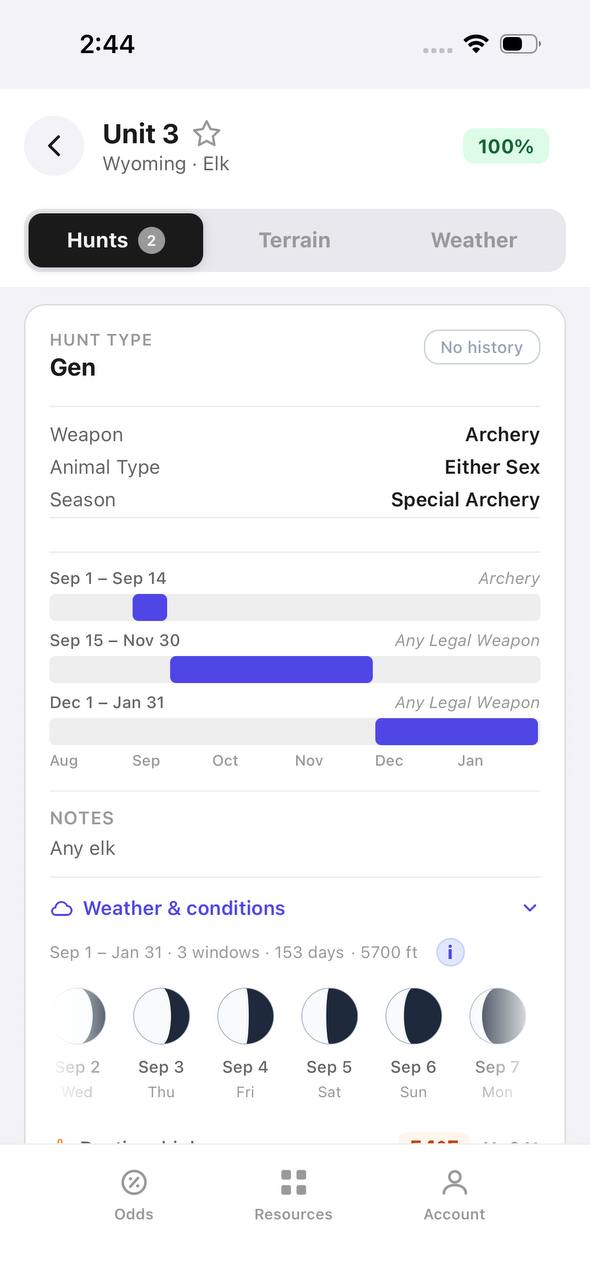
Wyoming elk unit detail, hunts tab, showing hunt windows on a timeline

Wyoming · Elk, Unit 3

Every hunt window inside one unit, laid out on a timeline.

Unit 3 has two hunt codes for elk. Each one shows its weapon, animal type, and season as a bar on a shared Aug–Jan timeline, plus a day-by-day moon phase strip.

  • Archery, then a long Any Legal Weapon window, then a late season — three opportunities in one unit.
  • The 100% badge at top means no real draw competition for the selected filters right now.
  • Weather & conditions expands below the hunt list without leaving the unit.
Terrain data
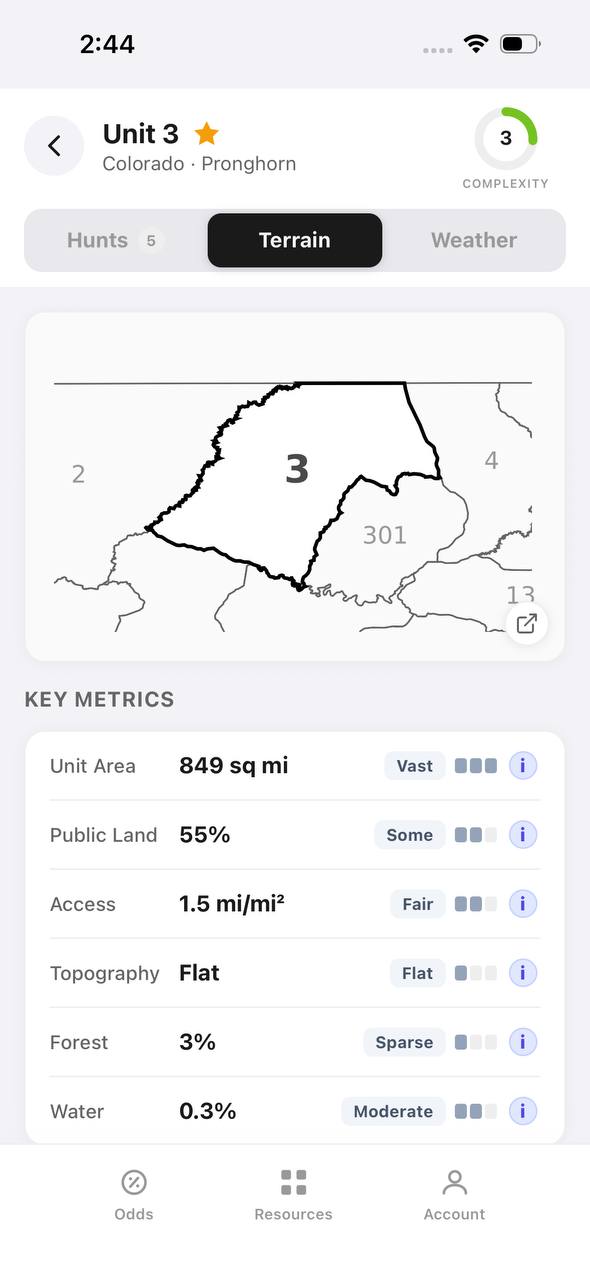
Colorado pronghorn unit detail, terrain tab, showing unit outline and key metrics

Colorado · Pronghorn, Unit 3

Unit boundaries and a complexity score at a glance.

The Terrain tab draws the unit outline against its neighbors and scores it for complexity, then breaks out area, public land, access, topography, forest, and water.

  • 849 sq mi, 55% public land, and flat topography make this a fairly approachable unit.
  • Each metric carries a short rating word — Vast, Some, Fair, Flat, Sparse, Moderate — with a tooltip.
  • The outline map shows adjacent units 2, 4, 13, and 301 for context.
State profiles
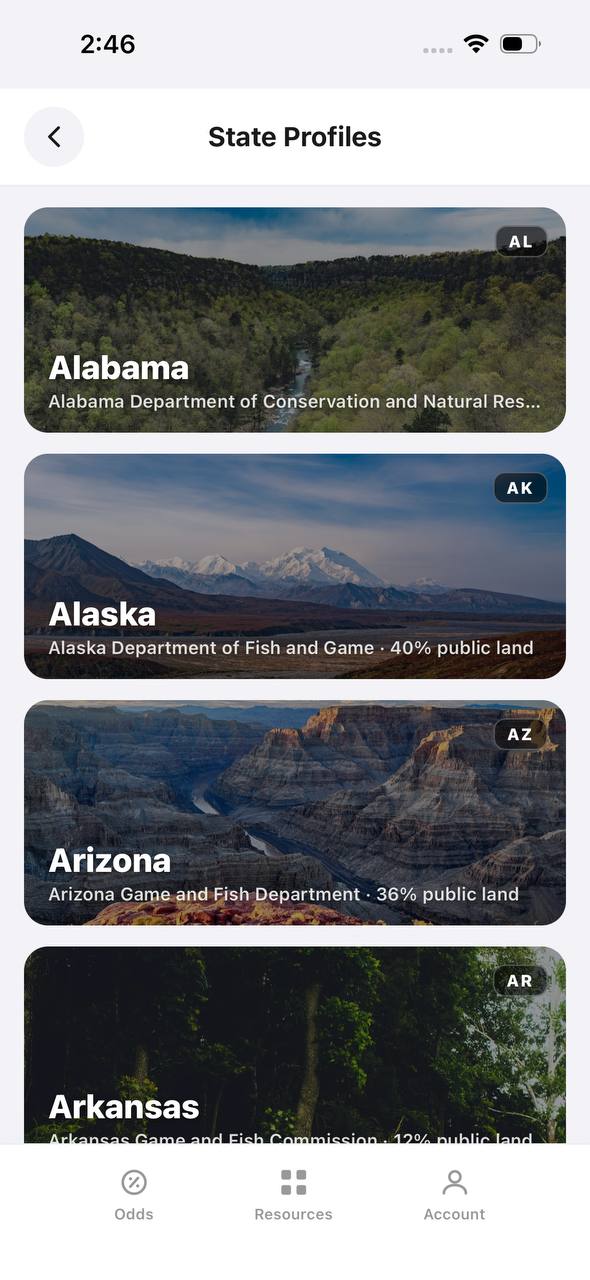
State Profiles screen listing states with wildlife agency and public land percentage

State Profiles

Each state's wildlife agency and public land share, at a glance.

State Profiles lists every covered state as a photo card naming its wildlife agency and, where available, its public land percentage.

  • Public land percentage shows right in the list, before opening the state.
  • Each card names the exact agency the regulations come from.
  • States without a public land figure yet, like Alabama here, are still listed.
Points wallet
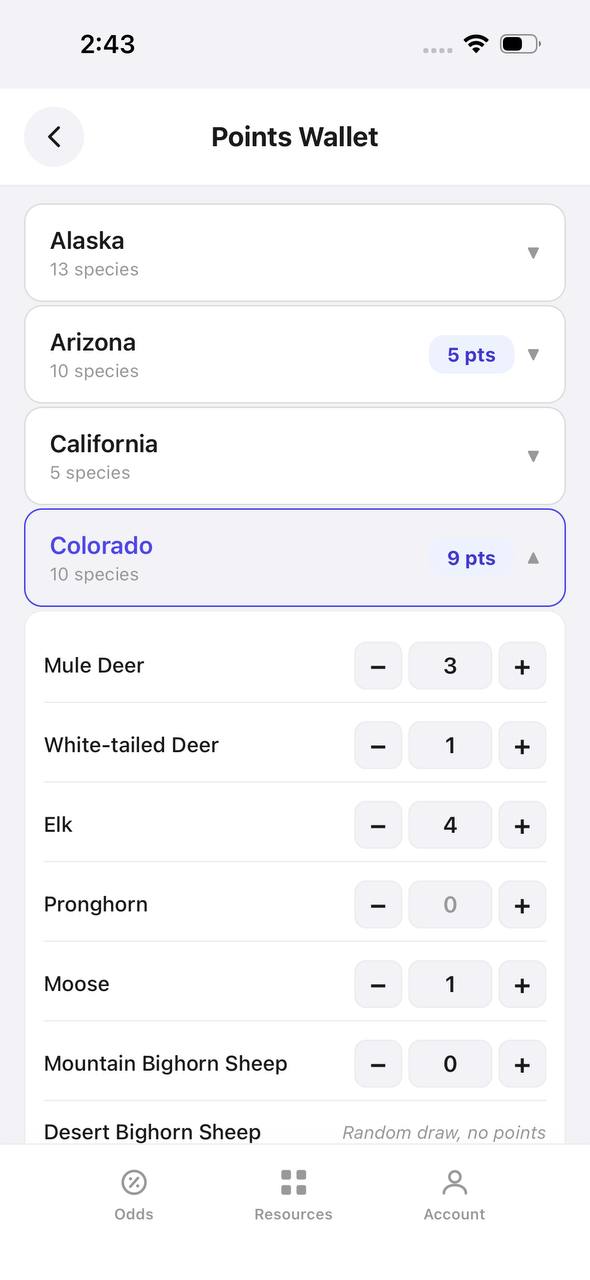
Points Wallet screen with Colorado expanded, showing a point stepper per species

Points Wallet · Colorado

Every state and species point balance in one wallet.

Points Wallet lists each state with a species count; expanding a state, like Colorado here, shows a stepper for every species so a balance can be entered or adjusted directly.

  • Colorado alone tracks points across 10 species independently.
  • Species with no points, like Pronghorn here, still show a zero to stay visible.
  • Desert Bighorn Sheep is flagged as a random draw with no points system.

Free to join

Download mobile app

  • Detailed draw odds
  • Point tracking
  • Deadline reminders
  • 18 states covered
Download on the App StoreGet it on Google Play
Draw odds
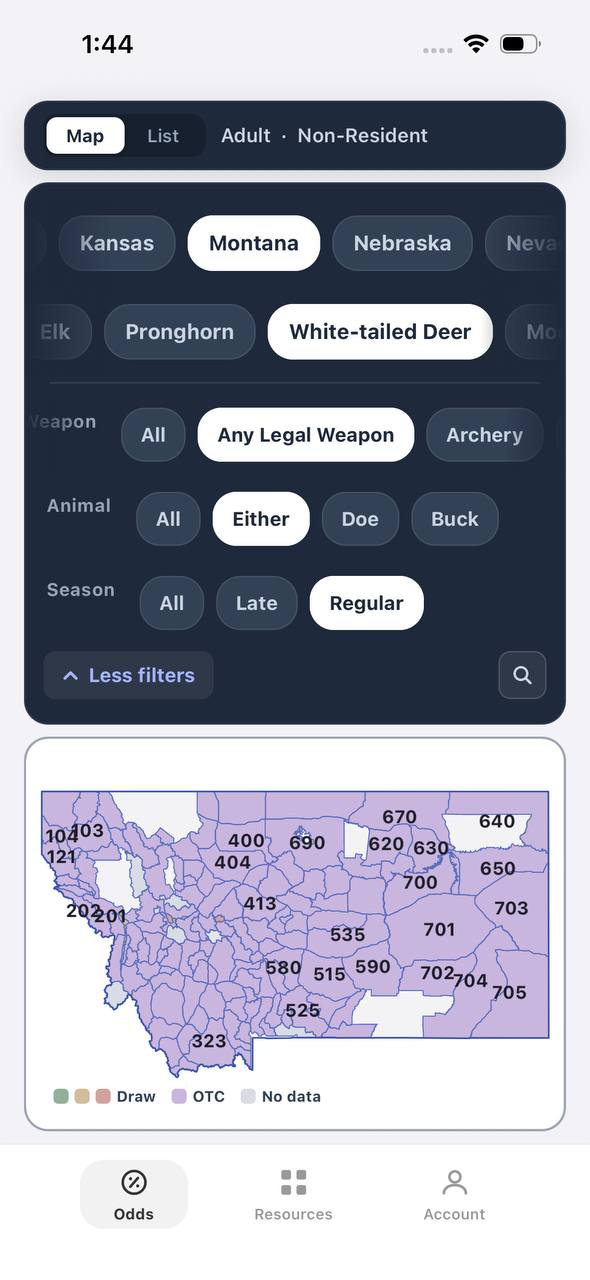
Montana white-tailed deer draw odds filtered to any legal weapon, either sex, regular season
AdultNonresidentAny Legal WeaponEitherRegular

Montana · White-tailed deer

Nearly the whole state is OTC for this filter combination.

Adult, Nonresident, White-tailed deer, filtered to Any Legal Weapon, Either, Regular. Under this combination almost every unit turns purple — over the counter.

  • Switching weapon, sex, or season changes the picture completely.
  • Purple means the tag can be bought directly, no draw.
  • This is the tag-and-go read of Montana whitetail, not the point-based one.
Terrain data
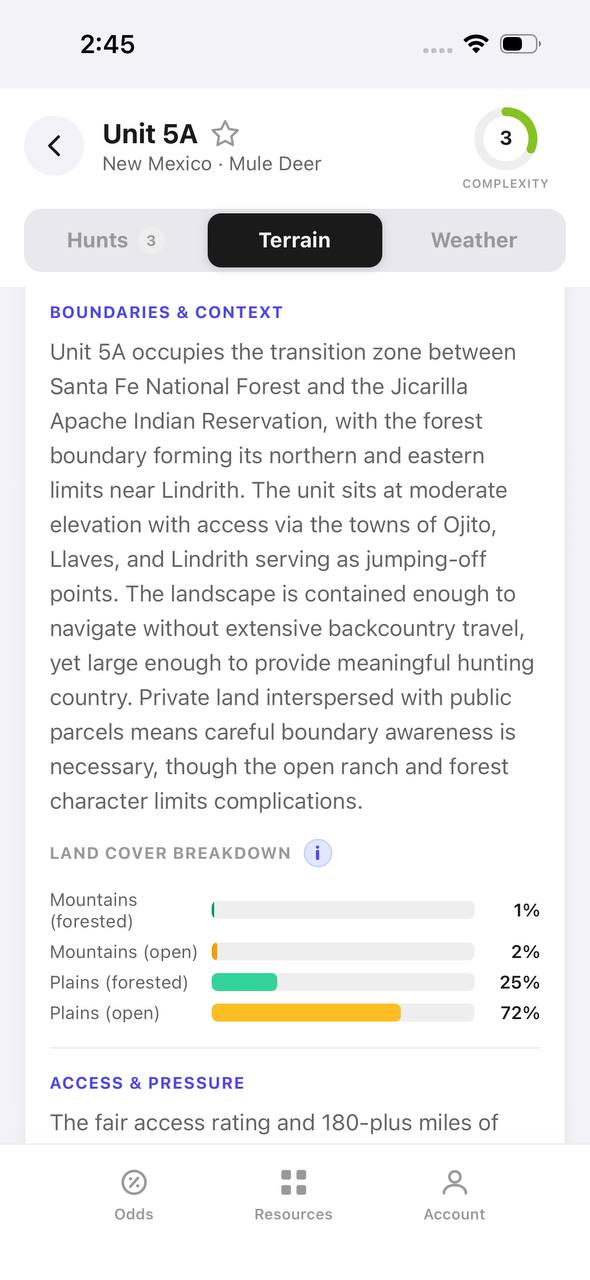
New Mexico mule deer unit 5A terrain tab with boundary description and land cover breakdown

New Mexico · Mule deer, Unit 5A

A written boundary description, not just a shape.

Unit 5A's terrain tab opens with a plain-language paragraph about surrounding land, access towns, and ownership mix, then a land cover breakdown by percentage.

  • 72% open plains and 25% forested plains describe the terrain at a glance.
  • The boundary text calls out the exact reservation and forest lines that define the unit.
  • Access & pressure continues below the fold with mileage detail.
Draw odds
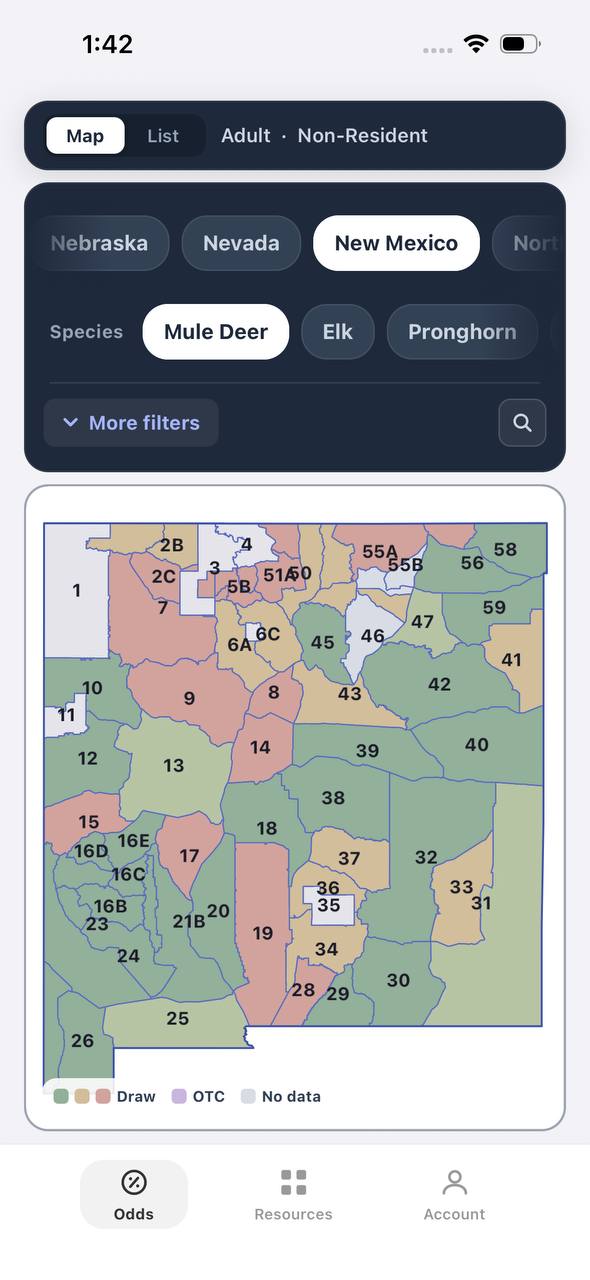
New Mexico mule deer draw odds by unit
AdultNonresident

New Mexico · Mule deer

Mule deer draw odds for every unit in the state.

Adult, Nonresident, Mule deer, all weapons and seasons. Each unit is colored by the same odds calculation used in the dashboard.

  • Green and tan together separate units worth applying to from units that are not.
  • Numbered units follow New Mexico's own game management unit boundaries.
  • Opening a unit shows the exact hunt behind the color.
Favorites
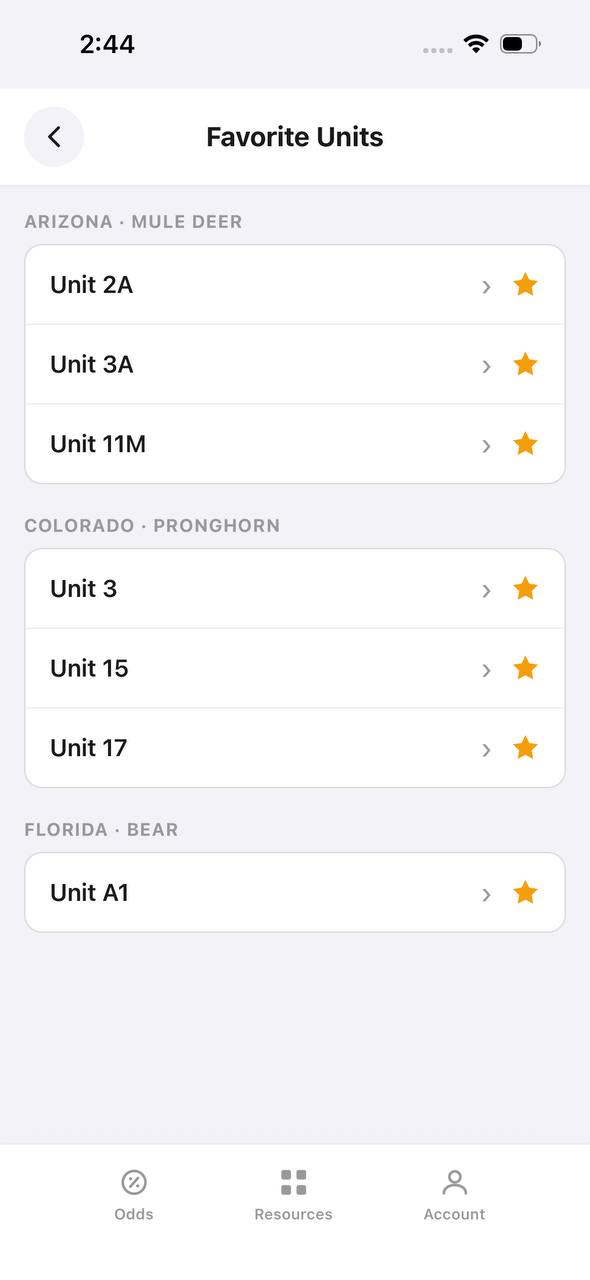
Favorite Units screen grouped by state and species

Favorite Units

Starred units from any state, grouped by species.

Favorite Units collects every starred unit across states and species into one list, grouped by state and species pair, so a saved unit is one tap away.

  • Arizona mule deer and Colorado pronghorn favorites sit side by side here.
  • Each row opens straight into that unit's detail view.
  • Unstarring from this screen removes it from the group instantly.
Deadlines
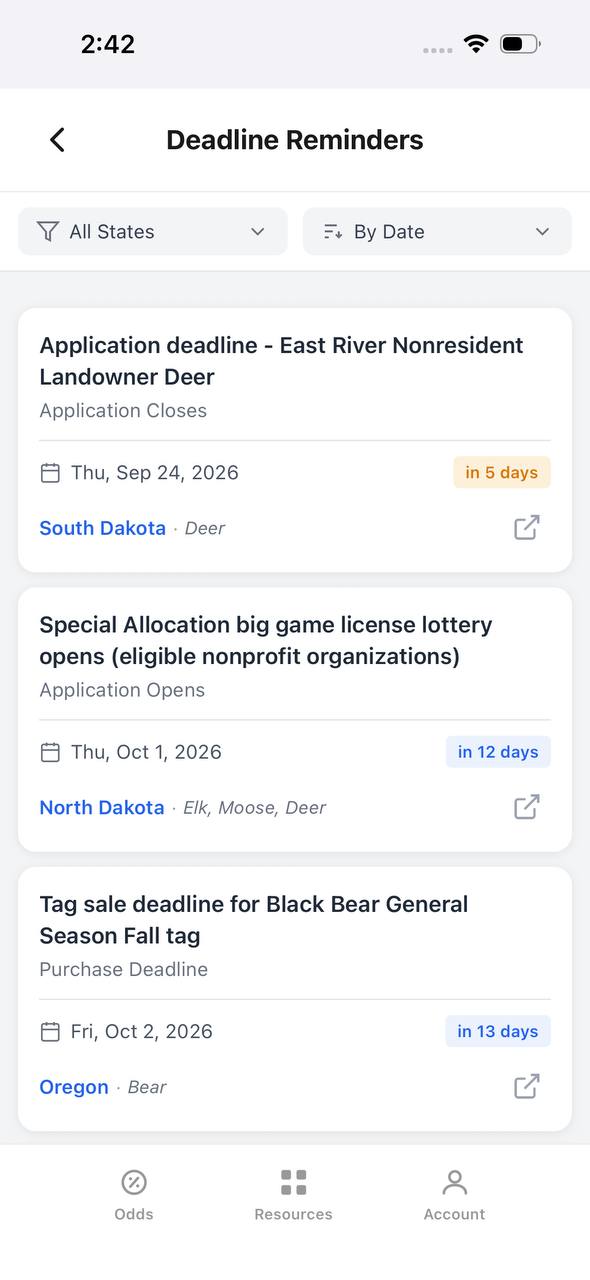
Deadline Reminders screen listing application and purchase deadlines by date

Deadline Reminders

Every application and purchase deadline, sorted by date.

Deadline Reminders filters by state and sorts by date, showing the deadline type, a countdown, and the state and species it applies to, with a link out to the source.

  • Countdown badges shift as a deadline gets close — "in 5 days" here, for example.
  • Application opens and closes are tracked as separate reminder types.
  • Each card links out to confirm the rule at the source.
Interactive map
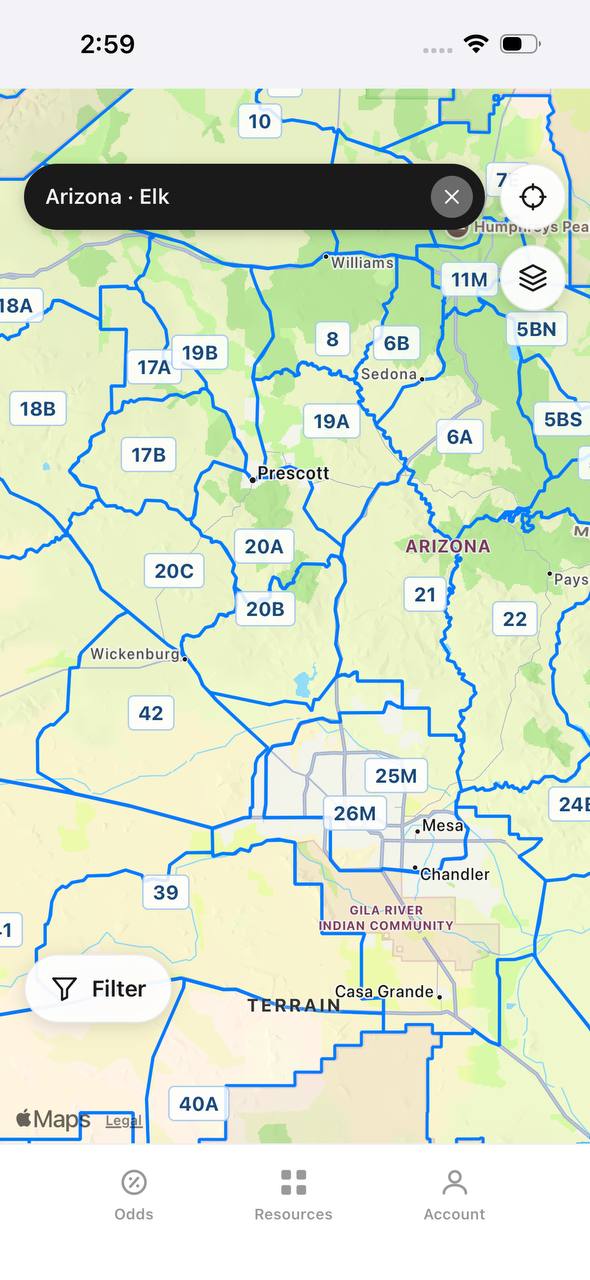
Arizona elk unit boundaries overlaid on an interactive street map

Arizona · Elk

Unit boundaries laid directly over a real map.

This view overlays Arizona elk unit boundaries and labels on top of a street map, with a search bar pinned to state and species and a layer toggle in the corner.

  • Real towns like Prescott and Sedona sit inside their unit boundaries for context.
  • A location button and layer switch float over the map, clear of the unit labels.
  • A Filter button at the bottom opens the same filters used elsewhere in the app.

Free to join

Download mobile app

  • Detailed draw odds
  • Point tracking
  • Deadline reminders
  • 18 states covered
Download on the App StoreGet it on Google Play
Insights
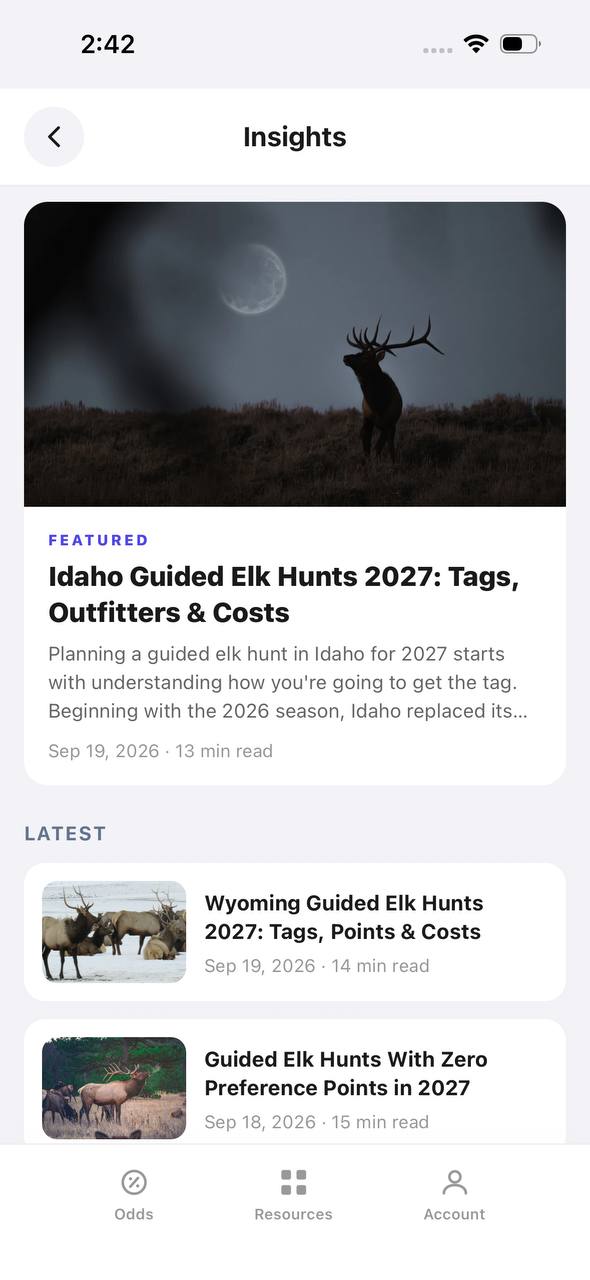
Insights screen with a featured article and a latest articles list

Insights

Hunting articles, built into the app itself.

Insights opens to a featured article with a hero image, then a Latest list of recent posts, each with a thumbnail, read time, and publish date.

  • The featured slot rotates to the newest deep-dive article.
  • Read time and publish date show on every card, not just the featured one.
  • This mirrors the blog content already published on the marketing site.
Download on the App StoreGet it on Google Play

Cooking Methods That Work

Alligator meat adapts to multiple cooking styles. The key is matching the cut to the method. Tender tail meat handles high heat well, while tougher cuts require slow cooking or moist heat.

Deep Frying

Fried alligator is the most popular preparation method across the South. Cut tail meat into nugget-sized pieces, season with salt and pepper, then dredge in seasoned flour or cornmeal. Fry in 350-degree oil until golden brown, about 3-4 minutes.

Serve with remoulade, cocktail sauce, or ranch dressing. Fried gator has a mild flavor and tender texture that appeals to skeptics trying it for the first time.

Grilling

Tail steaks grill beautifully over direct heat. Season with salt, pepper, and garlic powder or use your favorite dry rub. Grill over medium-high heat for 3-4 minutes per side. Alligator meat cooks quickly and becomes tough when overdone. Pull steaks off the grill when they reach 145-150 degrees internal temperature.

Baste with butter or oil during cooking to prevent drying. Let steaks rest for five minutes before serving.

Slow Cooking

Jaw and leg meat shine in slow-cooked applications. Cut meat into chunks and brown in a heavy pot with oil. Add vegetables, stock, and seasonings, then simmer for 2-3 hours until tender. Alligator gumbo, jambalaya, and chili are regional favorites that showcase this method.

The long cooking time breaks down connective tissue and infuses the meat with rich flavors from the braising liquid.

Blackening

Blackened alligator combines high heat with bold Cajun spices. Coat tail steaks or fillets in melted butter, then press into a blackening spice blend. Sear in a screaming-hot cast iron skillet for 2-3 minutes per side until a dark crust forms.

Blackening works best in a well-ventilated area or outdoors. The high heat creates smoke and a charred exterior that contrasts with the tender interior.

Recipe: Classic Fried Alligator Nuggets

This straightforward recipe highlights the natural flavor of gator tail meat without overwhelming it.

Ingredients:

  • 1 pound alligator tail meat, cut into 1-inch cubes
  • 1 cup buttermilk
  • 1 cup all-purpose flour
  • 1 tablespoon Cajun seasoning
  • 1 teaspoon salt
  • 1/2 teaspoon black pepper
  • Vegetable oil for frying

Instructions:

Soak meat in buttermilk for at least one hour. Combine flour, Cajun seasoning, salt, and pepper in a shallow dish. Heat oil to 350 degrees in a deep fryer or heavy pot. Remove meat from buttermilk and dredge in seasoned flour, shaking off excess. Fry in batches for 3-4 minutes until golden brown. Drain on paper towels and serve immediately with dipping sauce.

Draw odds
Alaska moose draw odds by unit, colored by draw, OTC, or no data
AdultNonresident

Alaska · Moose

Draw, OTC, and no-data units across the whole state.

Adult, Nonresident, Moose, no additional filters. Every unit is colored by its best matching draw odds; if nothing draws, it shows OTC; if neither, no data.

  • Alaska mixes draw and OTC moose hunts within the same region.
  • Green units are worth an application; purple units are OTC.
  • Filters stay applied when a unit is opened for hunt detail.
Draw odds
California mule deer draw odds ranked by unit in a list
AdultNonresident

California · Mule deer

Nonresident odds ranked unit by unit.

Adult, Nonresident, Mule deer, no weapon or season chip, so every matching hunt in a zone is combined into one badge and sorted by best projected odds.

  • D6 leads the list; a range like 8%–14% means more than one hunt code exists in that zone.
  • The list and the map read the same filtered hunt set.
  • 46 units are shown for this species and state alone.

Free to join

Download mobile app

  • Detailed draw odds
  • Point tracking
  • Deadline reminders
  • 18 states covered
Download on the App StoreGet it on Google Play
Unit detail
Wyoming elk unit detail, hunts tab, showing hunt windows on a timeline

Wyoming · Elk, Unit 3

Every hunt window inside one unit, laid out on a timeline.

Unit 3 has two hunt codes for elk. Each one shows its weapon, animal type, and season as a bar on a shared Aug–Jan timeline, plus a day-by-day moon phase strip.

  • Archery, then a long Any Legal Weapon window, then a late season — three opportunities in one unit.
  • The 100% badge at top means no real draw competition for the selected filters right now.
  • Weather & conditions expands below the hunt list without leaving the unit.
Terrain data
Colorado pronghorn unit detail, terrain tab, showing unit outline and key metrics

Colorado · Pronghorn, Unit 3

Unit boundaries and a complexity score at a glance.

The Terrain tab draws the unit outline against its neighbors and scores it for complexity, then breaks out area, public land, access, topography, forest, and water.

  • 849 sq mi, 55% public land, and flat topography make this a fairly approachable unit.
  • Each metric carries a short rating word — Vast, Some, Fair, Flat, Sparse, Moderate — with a tooltip.
  • The outline map shows adjacent units 2, 4, 13, and 301 for context.
State profiles
State Profiles screen listing states with wildlife agency and public land percentage

State Profiles

Each state's wildlife agency and public land share, at a glance.

State Profiles lists every covered state as a photo card naming its wildlife agency and, where available, its public land percentage.

  • Public land percentage shows right in the list, before opening the state.
  • Each card names the exact agency the regulations come from.
  • States without a public land figure yet, like Alabama here, are still listed.
Points wallet
Points Wallet screen with Colorado expanded, showing a point stepper per species

Points Wallet · Colorado

Every state and species point balance in one wallet.

Points Wallet lists each state with a species count; expanding a state, like Colorado here, shows a stepper for every species so a balance can be entered or adjusted directly.

  • Colorado alone tracks points across 10 species independently.
  • Species with no points, like Pronghorn here, still show a zero to stay visible.
  • Desert Bighorn Sheep is flagged as a random draw with no points system.

Free to join

Download mobile app

  • Detailed draw odds
  • Point tracking
  • Deadline reminders
  • 18 states covered
Download on the App StoreGet it on Google Play
Draw odds
Montana white-tailed deer draw odds filtered to any legal weapon, either sex, regular season
AdultNonresidentAny Legal WeaponEitherRegular

Montana · White-tailed deer

Nearly the whole state is OTC for this filter combination.

Adult, Nonresident, White-tailed deer, filtered to Any Legal Weapon, Either, Regular. Under this combination almost every unit turns purple — over the counter.

  • Switching weapon, sex, or season changes the picture completely.
  • Purple means the tag can be bought directly, no draw.
  • This is the tag-and-go read of Montana whitetail, not the point-based one.
Terrain data
New Mexico mule deer unit 5A terrain tab with boundary description and land cover breakdown

New Mexico · Mule deer, Unit 5A

A written boundary description, not just a shape.

Unit 5A's terrain tab opens with a plain-language paragraph about surrounding land, access towns, and ownership mix, then a land cover breakdown by percentage.

  • 72% open plains and 25% forested plains describe the terrain at a glance.
  • The boundary text calls out the exact reservation and forest lines that define the unit.
  • Access & pressure continues below the fold with mileage detail.
Draw odds
New Mexico mule deer draw odds by unit
AdultNonresident

New Mexico · Mule deer

Mule deer draw odds for every unit in the state.

Adult, Nonresident, Mule deer, all weapons and seasons. Each unit is colored by the same odds calculation used in the dashboard.

  • Green and tan together separate units worth applying to from units that are not.
  • Numbered units follow New Mexico's own game management unit boundaries.
  • Opening a unit shows the exact hunt behind the color.
Favorites
Favorite Units screen grouped by state and species

Favorite Units

Starred units from any state, grouped by species.

Favorite Units collects every starred unit across states and species into one list, grouped by state and species pair, so a saved unit is one tap away.

  • Arizona mule deer and Colorado pronghorn favorites sit side by side here.
  • Each row opens straight into that unit's detail view.
  • Unstarring from this screen removes it from the group instantly.
Deadlines
Deadline Reminders screen listing application and purchase deadlines by date

Deadline Reminders

Every application and purchase deadline, sorted by date.

Deadline Reminders filters by state and sorts by date, showing the deadline type, a countdown, and the state and species it applies to, with a link out to the source.

  • Countdown badges shift as a deadline gets close — "in 5 days" here, for example.
  • Application opens and closes are tracked as separate reminder types.
  • Each card links out to confirm the rule at the source.
Interactive map
Arizona elk unit boundaries overlaid on an interactive street map

Arizona · Elk

Unit boundaries laid directly over a real map.

This view overlays Arizona elk unit boundaries and labels on top of a street map, with a search bar pinned to state and species and a layer toggle in the corner.

  • Real towns like Prescott and Sedona sit inside their unit boundaries for context.
  • A location button and layer switch float over the map, clear of the unit labels.
  • A Filter button at the bottom opens the same filters used elsewhere in the app.

Free to join

Download mobile app

  • Detailed draw odds
  • Point tracking
  • Deadline reminders
  • 18 states covered
Download on the App StoreGet it on Google Play
Insights
Insights screen with a featured article and a latest articles list

Insights

Hunting articles, built into the app itself.

Insights opens to a featured article with a hero image, then a Latest list of recent posts, each with a thumbnail, read time, and publish date.

  • The featured slot rotates to the newest deep-dive article.
  • Read time and publish date show on every card, not just the featured one.
  • This mirrors the blog content already published on the marketing site.
Download on the App StoreGet it on Google Play

Recipe: Alligator Gumbo

This slow-cooked gumbo transforms tougher cuts into a hearty meal.

Ingredients:

  • 2 pounds alligator jaw meat, cubed
  • 1/2 cup vegetable oil
  • 1/2 cup all-purpose flour
  • 1 large onion, diced
  • 1 bell pepper, diced
  • 3 celery stalks, diced
  • 4 cloves garlic, minced
  • 1 pound andouille sausage, sliced
  • 6 cups chicken stock
  • 2 bay leaves
  • 2 tablespoons Cajun seasoning
  • Salt and pepper to taste
  • Cooked rice for serving
  • Sliced green onions and filé powder for garnish

Instructions:

Make a dark roux by heating oil in a heavy pot over medium heat. Gradually whisk in flour and cook, stirring constantly, until the mixture turns the color of chocolate, about 20-30 minutes. Add onion, bell pepper, celery, and garlic. Cook until vegetables soften, about 5 minutes. Add alligator meat and sausage, stirring to coat with roux. Pour in chicken stock and add bay leaves and Cajun seasoning. Bring to a boil, then reduce heat and simmer for 2-3 hours until meat is tender. Season with salt and pepper. Serve over rice with green onions and a pinch of filé powder.

Storage and Freezing

Fresh alligator meat keeps in the refrigerator for 2-3 days. For longer storage, vacuum seal and freeze. Properly frozen gator meat maintains quality for up to six months.

Label packages with the cut type and date. Thaw frozen meat in the refrigerator overnight before cooking. Avoid refreezing thawed meat, which degrades texture and moisture content.

Alternatively, process meat into sausage, jerky, or ground products for variety. Alligator sausage mixed with pork fat rivals traditional venison sausage in flavor and texture.

Common Mistakes to Avoid

Overcooking is the most common error with alligator meat. The lean tissue dries out and becomes rubbery when cooked past medium. Use a meat thermometer and pull the meat at 145-150 degrees for tail cuts.

Skipping the brine or marinade results in dry, bland meat. Even a short saltwater brine dramatically improves moisture and flavor.

Using dull knives during butchering tears meat and creates ragged cuts. Sharp knives produce clean cuts that look better and cook more evenly.

Neglecting proper cooling in the field leads to spoiled meat. Alligators retain heat longer than most game animals, so prioritize cooling immediately after harvest.

Draw odds
Alaska moose draw odds by unit, colored by draw, OTC, or no data
AdultNonresident

Alaska · Moose

Draw, OTC, and no-data units across the whole state.

Adult, Nonresident, Moose, no additional filters. Every unit is colored by its best matching draw odds; if nothing draws, it shows OTC; if neither, no data.

  • Alaska mixes draw and OTC moose hunts within the same region.
  • Green units are worth an application; purple units are OTC.
  • Filters stay applied when a unit is opened for hunt detail.
Draw odds
California mule deer draw odds ranked by unit in a list
AdultNonresident

California · Mule deer

Nonresident odds ranked unit by unit.

Adult, Nonresident, Mule deer, no weapon or season chip, so every matching hunt in a zone is combined into one badge and sorted by best projected odds.

  • D6 leads the list; a range like 8%–14% means more than one hunt code exists in that zone.
  • The list and the map read the same filtered hunt set.
  • 46 units are shown for this species and state alone.

Free to join

Download mobile app

  • Detailed draw odds
  • Point tracking
  • Deadline reminders
  • 18 states covered
Download on the App StoreGet it on Google Play
Unit detail
Wyoming elk unit detail, hunts tab, showing hunt windows on a timeline

Wyoming · Elk, Unit 3

Every hunt window inside one unit, laid out on a timeline.

Unit 3 has two hunt codes for elk. Each one shows its weapon, animal type, and season as a bar on a shared Aug–Jan timeline, plus a day-by-day moon phase strip.

  • Archery, then a long Any Legal Weapon window, then a late season — three opportunities in one unit.
  • The 100% badge at top means no real draw competition for the selected filters right now.
  • Weather & conditions expands below the hunt list without leaving the unit.
Terrain data
Colorado pronghorn unit detail, terrain tab, showing unit outline and key metrics

Colorado · Pronghorn, Unit 3

Unit boundaries and a complexity score at a glance.

The Terrain tab draws the unit outline against its neighbors and scores it for complexity, then breaks out area, public land, access, topography, forest, and water.

  • 849 sq mi, 55% public land, and flat topography make this a fairly approachable unit.
  • Each metric carries a short rating word — Vast, Some, Fair, Flat, Sparse, Moderate — with a tooltip.
  • The outline map shows adjacent units 2, 4, 13, and 301 for context.
State profiles
State Profiles screen listing states with wildlife agency and public land percentage

State Profiles

Each state's wildlife agency and public land share, at a glance.

State Profiles lists every covered state as a photo card naming its wildlife agency and, where available, its public land percentage.

  • Public land percentage shows right in the list, before opening the state.
  • Each card names the exact agency the regulations come from.
  • States without a public land figure yet, like Alabama here, are still listed.
Points wallet
Points Wallet screen with Colorado expanded, showing a point stepper per species

Points Wallet · Colorado

Every state and species point balance in one wallet.

Points Wallet lists each state with a species count; expanding a state, like Colorado here, shows a stepper for every species so a balance can be entered or adjusted directly.

  • Colorado alone tracks points across 10 species independently.
  • Species with no points, like Pronghorn here, still show a zero to stay visible.
  • Desert Bighorn Sheep is flagged as a random draw with no points system.

Free to join

Download mobile app

  • Detailed draw odds
  • Point tracking
  • Deadline reminders
  • 18 states covered
Download on the App StoreGet it on Google Play
Draw odds
Montana white-tailed deer draw odds filtered to any legal weapon, either sex, regular season
AdultNonresidentAny Legal WeaponEitherRegular

Montana · White-tailed deer

Nearly the whole state is OTC for this filter combination.

Adult, Nonresident, White-tailed deer, filtered to Any Legal Weapon, Either, Regular. Under this combination almost every unit turns purple — over the counter.

  • Switching weapon, sex, or season changes the picture completely.
  • Purple means the tag can be bought directly, no draw.
  • This is the tag-and-go read of Montana whitetail, not the point-based one.
Terrain data
New Mexico mule deer unit 5A terrain tab with boundary description and land cover breakdown

New Mexico · Mule deer, Unit 5A

A written boundary description, not just a shape.

Unit 5A's terrain tab opens with a plain-language paragraph about surrounding land, access towns, and ownership mix, then a land cover breakdown by percentage.

  • 72% open plains and 25% forested plains describe the terrain at a glance.
  • The boundary text calls out the exact reservation and forest lines that define the unit.
  • Access & pressure continues below the fold with mileage detail.
Draw odds
New Mexico mule deer draw odds by unit
AdultNonresident

New Mexico · Mule deer

Mule deer draw odds for every unit in the state.

Adult, Nonresident, Mule deer, all weapons and seasons. Each unit is colored by the same odds calculation used in the dashboard.

  • Green and tan together separate units worth applying to from units that are not.
  • Numbered units follow New Mexico's own game management unit boundaries.
  • Opening a unit shows the exact hunt behind the color.
Favorites
Favorite Units screen grouped by state and species

Favorite Units

Starred units from any state, grouped by species.

Favorite Units collects every starred unit across states and species into one list, grouped by state and species pair, so a saved unit is one tap away.

  • Arizona mule deer and Colorado pronghorn favorites sit side by side here.
  • Each row opens straight into that unit's detail view.
  • Unstarring from this screen removes it from the group instantly.
Deadlines
Deadline Reminders screen listing application and purchase deadlines by date

Deadline Reminders

Every application and purchase deadline, sorted by date.

Deadline Reminders filters by state and sorts by date, showing the deadline type, a countdown, and the state and species it applies to, with a link out to the source.

  • Countdown badges shift as a deadline gets close — "in 5 days" here, for example.
  • Application opens and closes are tracked as separate reminder types.
  • Each card links out to confirm the rule at the source.
Interactive map
Arizona elk unit boundaries overlaid on an interactive street map

Arizona · Elk

Unit boundaries laid directly over a real map.

This view overlays Arizona elk unit boundaries and labels on top of a street map, with a search bar pinned to state and species and a layer toggle in the corner.

  • Real towns like Prescott and Sedona sit inside their unit boundaries for context.
  • A location button and layer switch float over the map, clear of the unit labels.
  • A Filter button at the bottom opens the same filters used elsewhere in the app.

Free to join

Download mobile app

  • Detailed draw odds
  • Point tracking
  • Deadline reminders
  • 18 states covered
Download on the App StoreGet it on Google Play
Insights
Insights screen with a featured article and a latest articles list

Insights

Hunting articles, built into the app itself.

Insights opens to a featured article with a hero image, then a Latest list of recent posts, each with a thumbnail, read time, and publish date.

  • The featured slot rotates to the newest deep-dive article.
  • Read time and publish date show on every card, not just the featured one.
  • This mirrors the blog content already published on the marketing site.
Download on the App StoreGet it on Google Play

How TAGZ Helps Plan Your Alligator Hunt

Planning an alligator hunt requires understanding draw systems, season dates, and unit-specific regulations across multiple states. TAGZ tracks draw odds, application deadlines, and preference points for Louisiana, Florida, Georgia, and other gator-hunting states.

Compare units side by side using terrain maps and historical harvest data. TAGZ filters hunts by weapon type, season length, and harvest success rates so you can identify the best opportunities before applying. Whether you are chasing your first gator or planning a trophy hunt, TAGZ simplifies the research process and helps you make informed decisions about where and when to hunt.

FAQ — Alligator Meat Processing

What does alligator meat taste like?

Alligator tail meat is mild, tender, and similar to chicken or pork loin. Jaw meat is darker with a stronger flavor closer to wild duck or dark turkey meat.

How long can you wait to process an alligator after harvest?

Process within 4-6 hours for best quality. If you cannot process immediately, gut the animal and pack the body cavity with ice to keep meat cool.

Is alligator meat healthy to eat?

Yes. Alligator is lean, high in protein, and low in fat. A 3-ounce serving contains about 100 calories and 20 grams of protein with minimal saturated fat.

Can you eat the whole alligator?

No. The tail, jaw, and legs contain most usable meat. The body cavity holds organs and very little muscle tissue worth salvaging.

What is the best cut of alligator for first-timers?

Tail meat is the most tender and mild. Fried tail nuggets are the best introduction for people new to eating alligator.

How do you know when alligator meat is fully cooked?

Alligator is fully cooked at 145 degrees internal temperature. The meat turns white and opaque, similar to cooked chicken breast.

Can you grind alligator meat for sausage?

Yes. Jaw and leg meat work well ground and mixed with pork fat for sausage, burgers, or chili. Add 20-30% pork fat for moisture.

Does alligator meat freeze well?

Yes. Vacuum-sealed alligator meat freezes well for up to six months. Thaw in the refrigerator before cooking.

Continue Planning Your Hunt

Alligator hunting offers a unique challenge and exceptional table fare when processed correctly. If you are ready to plan your next hunt, explore draw odds and unit details on TAGZ to find the best opportunities in your target state. Track application deadlines and compare harvest data across multiple units so you never miss a draw window. Visit the TAGZ Insights blog for more processing guides, hunt planning strategies, and species-specific tips. For full access to draw analytics, preference point tracking, and interactive unit maps, check out TAGZ pricing options and start making smarter hunting decisions today.