Mobile Hunting Strategy: Real-World Lessons for Western Big Game
ScoutingPublic Land
3 min read·Jun 3, 2026·TAGZ
Mobile Hunting Strategy: Real-World Lessons for Western Big Game

If you want more tags, fewer crowds, and better shot opportunities in the West, a mobile hunting strategy is your best bet. But there’s a lot more to it than just hiking farther or bouncing between camp spots. Here’s how I approach mobile hunting after years of chasing elk, mule deer, and pronghorn all over the Rockies and Great Basin.

Why Mobile Hunting Works in the West

Western public land is big country, and animals use it on their own schedule. If you’re glued to one drainage, you’ll probably miss out. Over the years, I’ve found that being mobile—willing to move camp, switch trailheads, or hike over the next ridge—pays off more than sticking with a single spot just because you scouted it once.

Reading Pressure and Adjusting Plans

Most hunters set up once and hope the animals come to them. Problem is, so does everyone else. If I find fresh boot tracks, lots of camps, or glass hunters on every knob, I’m gone. Mobile hunting means you’re always looking for the next pocket where animals get pushed by pressure—or where other hunters overlook entirely.

Terrain, Access, and Realistic Mobility

It’s easy to talk about moving, but the West makes you earn every mile. I use maps and satellite imagery before a hunt, but once boots are on the ground, I’m always thinking about:

  • Access points: Which roads or trails are open? Are there overlooked walk-in areas?
  • Escape cover: Where will elk or deer bail out when pushed?
  • Glassing knobs: Can I move quickly between vantage points?

Sometimes mobility means packing up a wall tent. Other times, it’s just tossing a spike camp in the truck bed and bombing up a new draw at daylight. The key is not getting locked into a routine. If you’re not seeing fresh sign after a day or two, it’s time to shift.

Scouting: Before and During the Season

I scout as much as possible in the summer, but I don’t get married to what I see. Animals move when hunting pressure hits or feed changes. Mobile hunting means scouting on the fly—reading new sign, glassing fresh country, and not being afraid to pivot.

If you hunt with a group, everyone needs to buy into this mentality. It’s not always easy to leave a comfortable camp, but it’s often the difference between a filled tag and eating tag soup.

Gear and Mindset for Staying Mobile

You don’t need ultralight everything, but you do need to be organized. My basics:

  • Backpack that can carry a day’s needs and meat if I kill far from the truck
  • OnX, TAGZ, or whatever mapping tool you trust for real-time decisions
  • Flexible camp setup—truck, tent, or bivy
  • A plan for processing and packing meat on the move

The mental part is just as important. Don’t get stubborn about one spot. Trust your instincts, hunt the sign, and don’t be afraid to burn a day moving if it means better odds tomorrow.
Draw odds
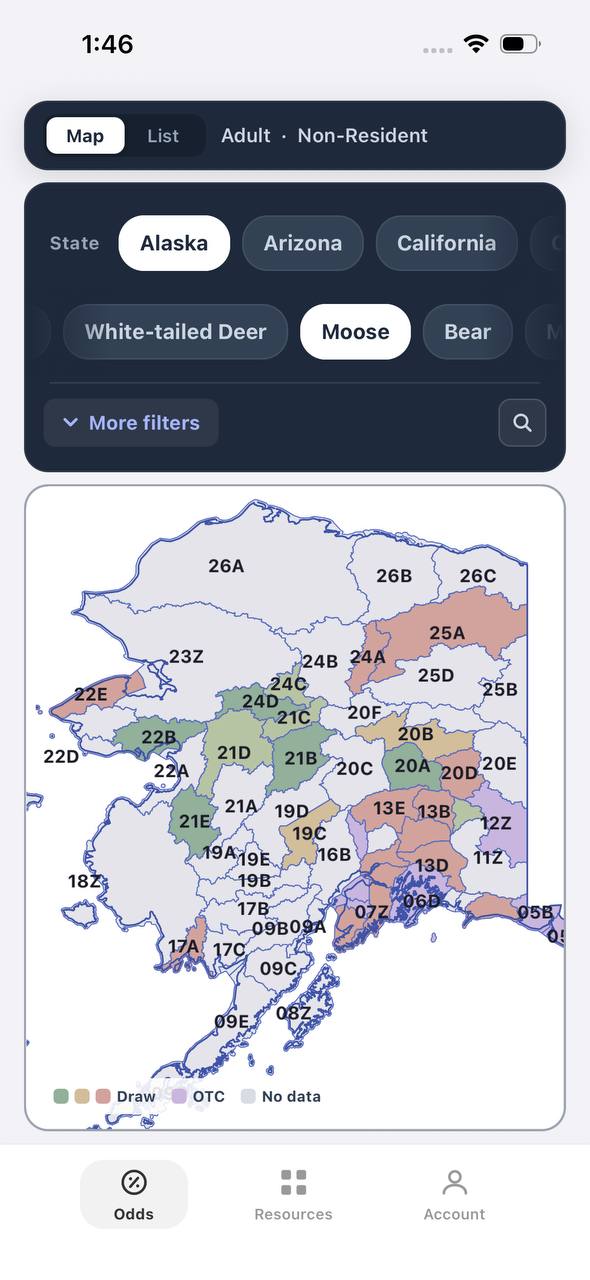
Alaska moose draw odds by unit, colored by draw, OTC, or no data
AdultNonresident

Alaska · Moose

Draw, OTC, and no-data units across the whole state.

Adult, Nonresident, Moose, no additional filters. Every unit is colored by its best matching draw odds; if nothing draws, it shows OTC; if neither, no data.

  • Alaska mixes draw and OTC moose hunts within the same region.
  • Green units are worth an application; purple units are OTC.
  • Filters stay applied when a unit is opened for hunt detail.
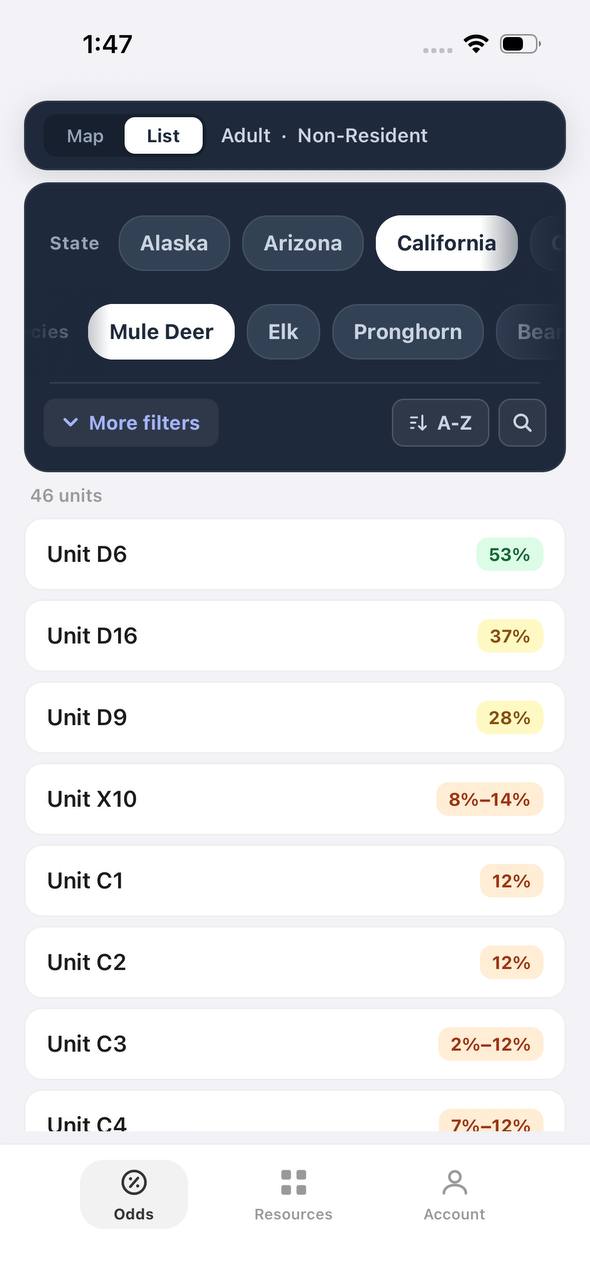
Draw odds
California mule deer draw odds ranked by unit in a list
AdultNonresident

California · Mule deer

Nonresident odds ranked unit by unit.

Adult, Nonresident, Mule deer, no weapon or season chip, so every matching hunt in a zone is combined into one badge and sorted by best projected odds.

  • D6 leads the list; a range like 8%–14% means more than one hunt code exists in that zone.
  • The list and the map read the same filtered hunt set.
  • 46 units are shown for this species and state alone.

Free to join

Download mobile app

  • Detailed draw odds
  • Point tracking
  • Deadline reminders
  • 18 states covered
Download on the App StoreGet it on Google Play
Unit detail
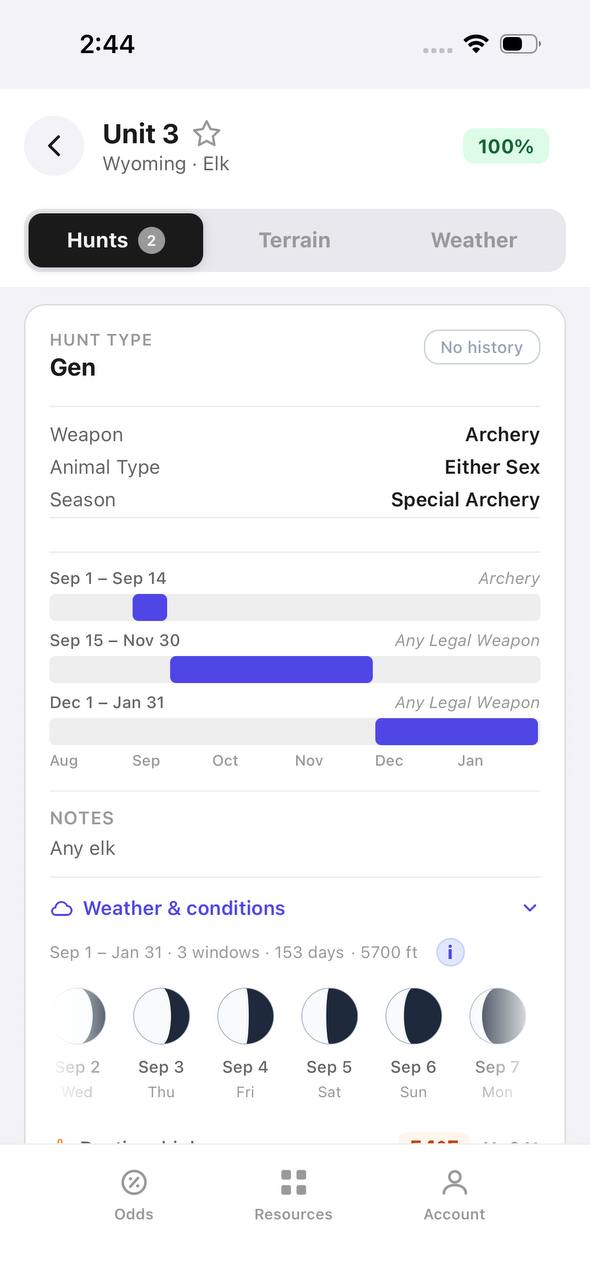
Wyoming elk unit detail, hunts tab, showing hunt windows on a timeline

Wyoming · Elk, Unit 3

Every hunt window inside one unit, laid out on a timeline.

Unit 3 has two hunt codes for elk. Each one shows its weapon, animal type, and season as a bar on a shared Aug–Jan timeline, plus a day-by-day moon phase strip.

  • Archery, then a long Any Legal Weapon window, then a late season — three opportunities in one unit.
  • The 100% badge at top means no real draw competition for the selected filters right now.
  • Weather & conditions expands below the hunt list without leaving the unit.
Terrain data
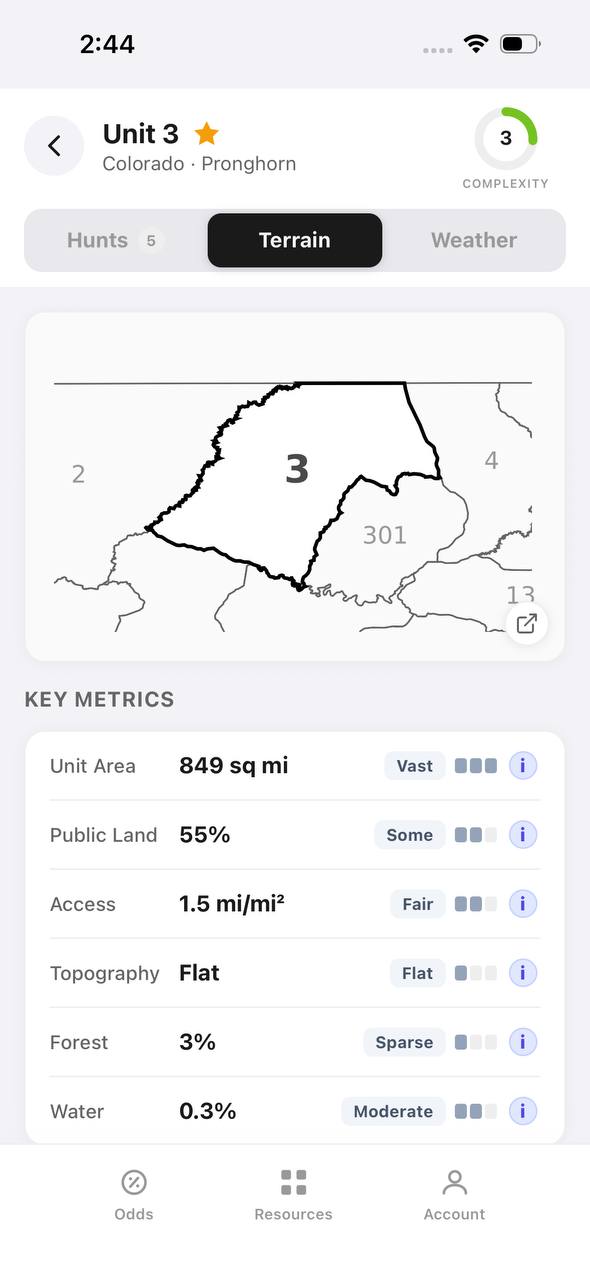
Colorado pronghorn unit detail, terrain tab, showing unit outline and key metrics

Colorado · Pronghorn, Unit 3

Unit boundaries and a complexity score at a glance.

The Terrain tab draws the unit outline against its neighbors and scores it for complexity, then breaks out area, public land, access, topography, forest, and water.

  • 849 sq mi, 55% public land, and flat topography make this a fairly approachable unit.
  • Each metric carries a short rating word — Vast, Some, Fair, Flat, Sparse, Moderate — with a tooltip.
  • The outline map shows adjacent units 2, 4, 13, and 301 for context.
State profiles
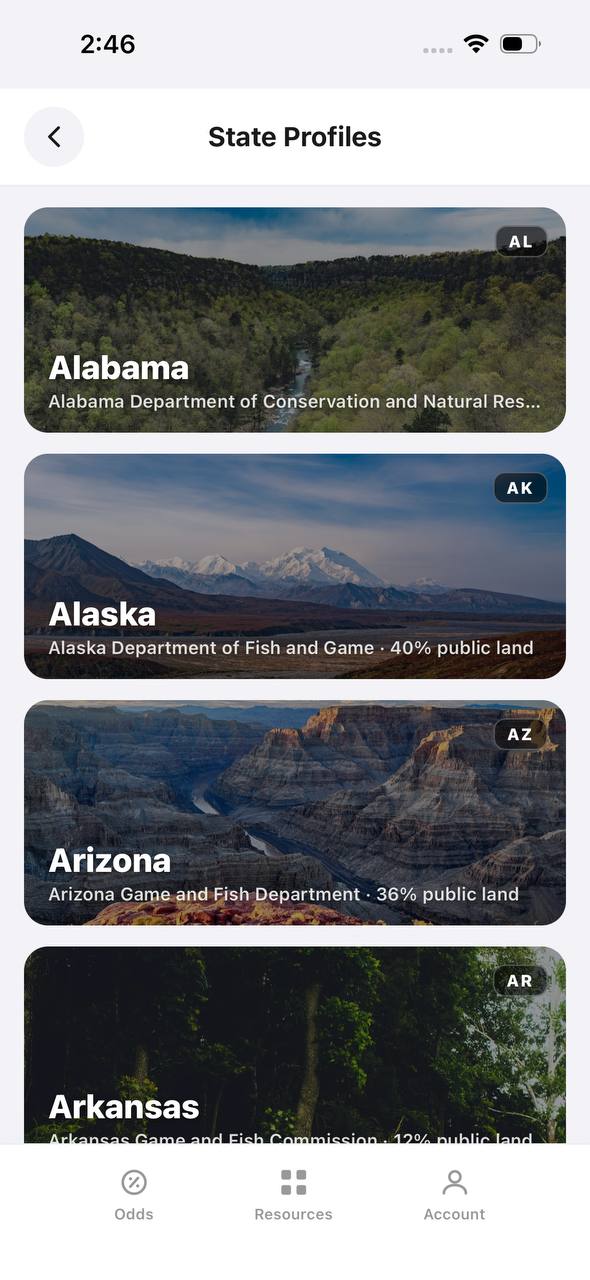
State Profiles screen listing states with wildlife agency and public land percentage

State Profiles

Each state's wildlife agency and public land share, at a glance.

State Profiles lists every covered state as a photo card naming its wildlife agency and, where available, its public land percentage.

  • Public land percentage shows right in the list, before opening the state.
  • Each card names the exact agency the regulations come from.
  • States without a public land figure yet, like Alabama here, are still listed.
Points wallet
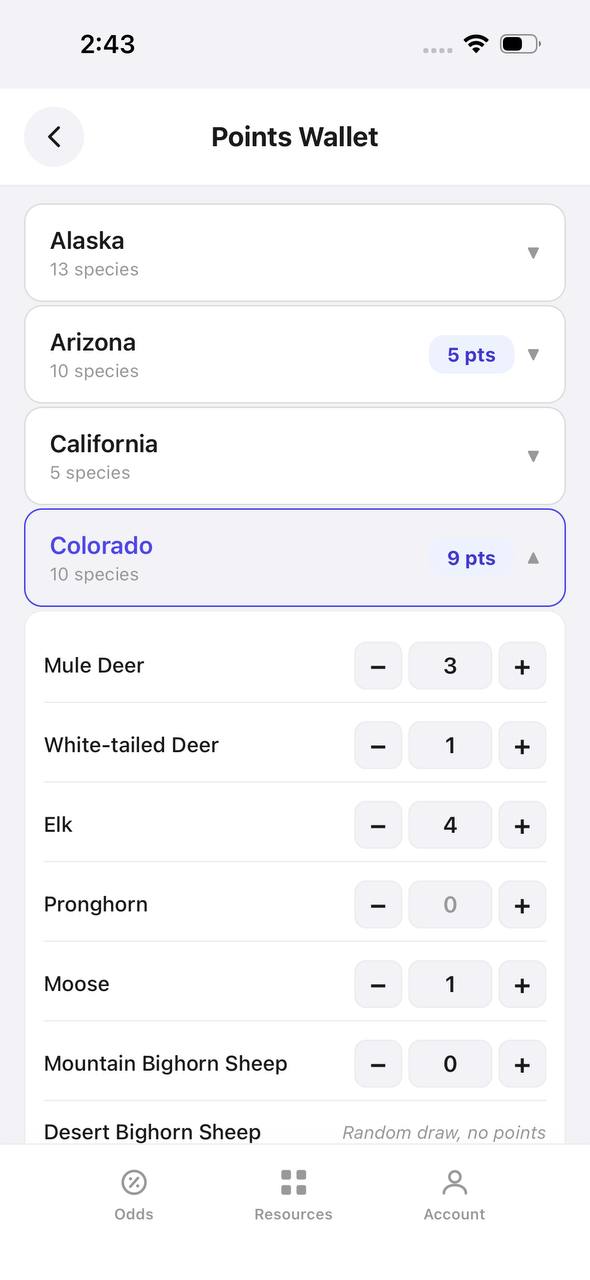
Points Wallet screen with Colorado expanded, showing a point stepper per species

Points Wallet · Colorado

Every state and species point balance in one wallet.

Points Wallet lists each state with a species count; expanding a state, like Colorado here, shows a stepper for every species so a balance can be entered or adjusted directly.

  • Colorado alone tracks points across 10 species independently.
  • Species with no points, like Pronghorn here, still show a zero to stay visible.
  • Desert Bighorn Sheep is flagged as a random draw with no points system.

Free to join

Download mobile app

  • Detailed draw odds
  • Point tracking
  • Deadline reminders
  • 18 states covered
Download on the App StoreGet it on Google Play
Draw odds
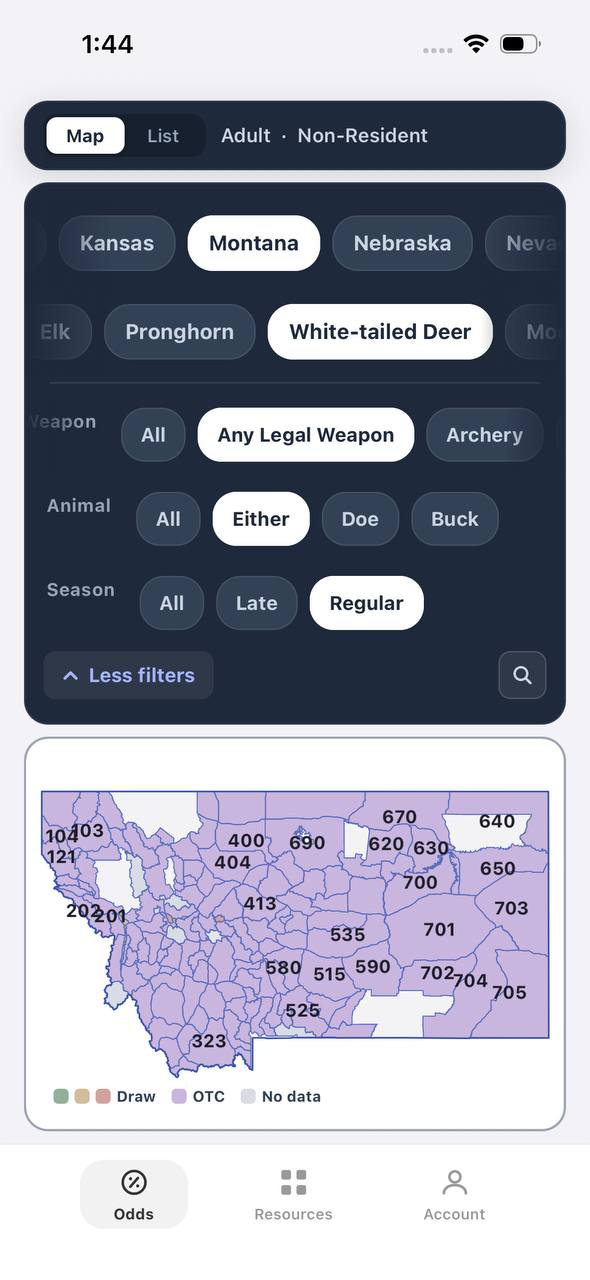
Montana white-tailed deer draw odds filtered to any legal weapon, either sex, regular season
AdultNonresidentAny Legal WeaponEitherRegular

Montana · White-tailed deer

Nearly the whole state is OTC for this filter combination.

Adult, Nonresident, White-tailed deer, filtered to Any Legal Weapon, Either, Regular. Under this combination almost every unit turns purple — over the counter.

  • Switching weapon, sex, or season changes the picture completely.
  • Purple means the tag can be bought directly, no draw.
  • This is the tag-and-go read of Montana whitetail, not the point-based one.
Terrain data
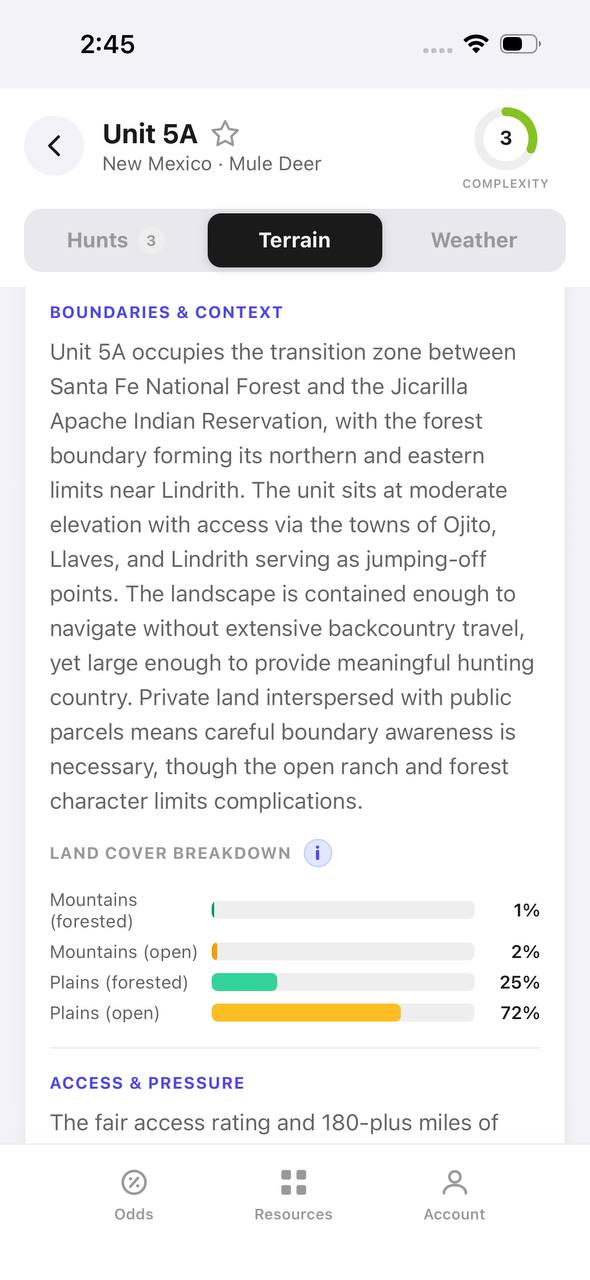
New Mexico mule deer unit 5A terrain tab with boundary description and land cover breakdown

New Mexico · Mule deer, Unit 5A

A written boundary description, not just a shape.

Unit 5A's terrain tab opens with a plain-language paragraph about surrounding land, access towns, and ownership mix, then a land cover breakdown by percentage.

  • 72% open plains and 25% forested plains describe the terrain at a glance.
  • The boundary text calls out the exact reservation and forest lines that define the unit.
  • Access & pressure continues below the fold with mileage detail.
Draw odds
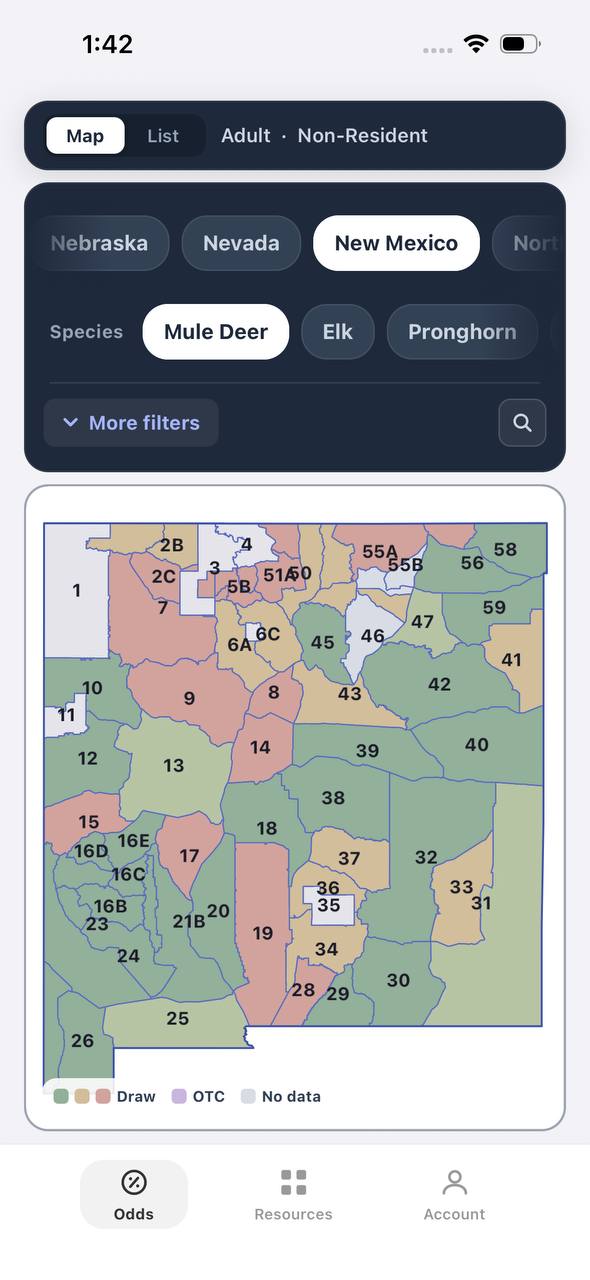
New Mexico mule deer draw odds by unit
AdultNonresident

New Mexico · Mule deer

Mule deer draw odds for every unit in the state.

Adult, Nonresident, Mule deer, all weapons and seasons. Each unit is colored by the same odds calculation used in the dashboard.

  • Green and tan together separate units worth applying to from units that are not.
  • Numbered units follow New Mexico's own game management unit boundaries.
  • Opening a unit shows the exact hunt behind the color.
Favorites
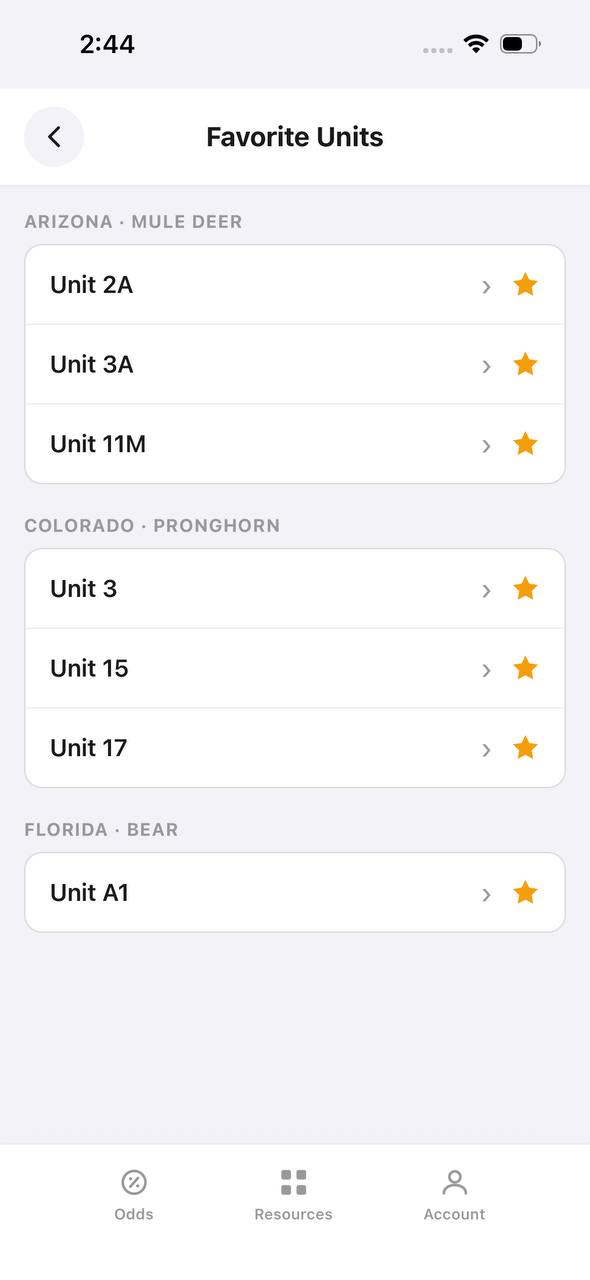
Favorite Units screen grouped by state and species

Favorite Units

Starred units from any state, grouped by species.

Favorite Units collects every starred unit across states and species into one list, grouped by state and species pair, so a saved unit is one tap away.

  • Arizona mule deer and Colorado pronghorn favorites sit side by side here.
  • Each row opens straight into that unit's detail view.
  • Unstarring from this screen removes it from the group instantly.
Deadlines
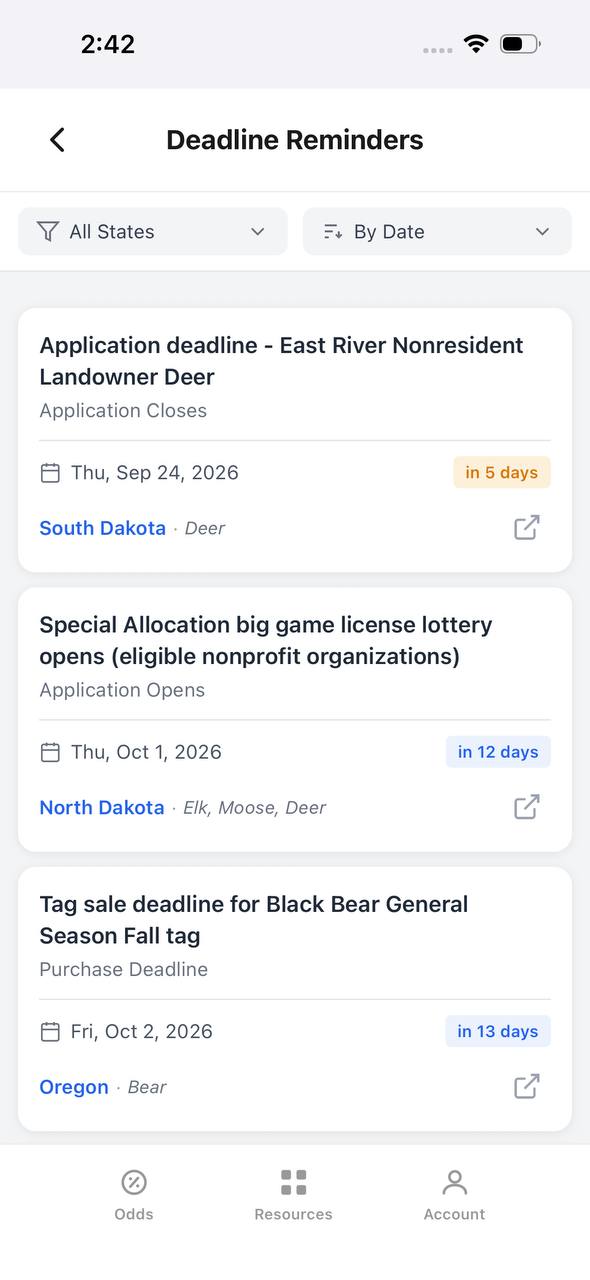
Deadline Reminders screen listing application and purchase deadlines by date

Deadline Reminders

Every application and purchase deadline, sorted by date.

Deadline Reminders filters by state and sorts by date, showing the deadline type, a countdown, and the state and species it applies to, with a link out to the source.

  • Countdown badges shift as a deadline gets close — "in 5 days" here, for example.
  • Application opens and closes are tracked as separate reminder types.
  • Each card links out to confirm the rule at the source.
Interactive map
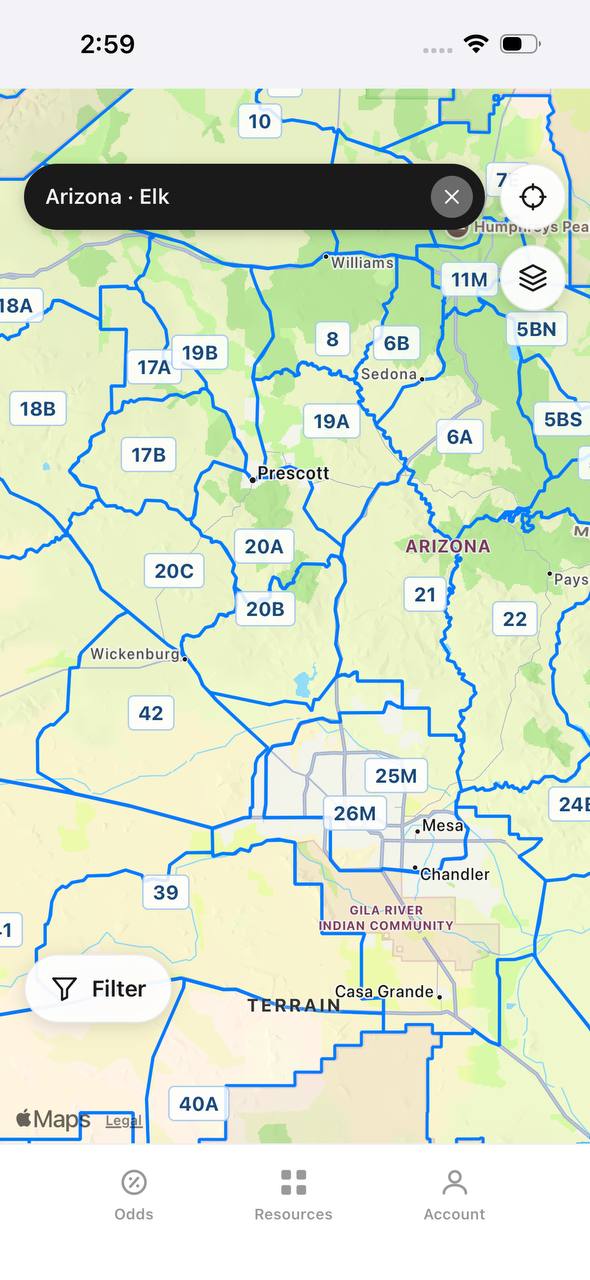
Arizona elk unit boundaries overlaid on an interactive street map

Arizona · Elk

Unit boundaries laid directly over a real map.

This view overlays Arizona elk unit boundaries and labels on top of a street map, with a search bar pinned to state and species and a layer toggle in the corner.

  • Real towns like Prescott and Sedona sit inside their unit boundaries for context.
  • A location button and layer switch float over the map, clear of the unit labels.
  • A Filter button at the bottom opens the same filters used elsewhere in the app.

Free to join

Download mobile app

  • Detailed draw odds
  • Point tracking
  • Deadline reminders
  • 18 states covered
Download on the App StoreGet it on Google Play
Insights
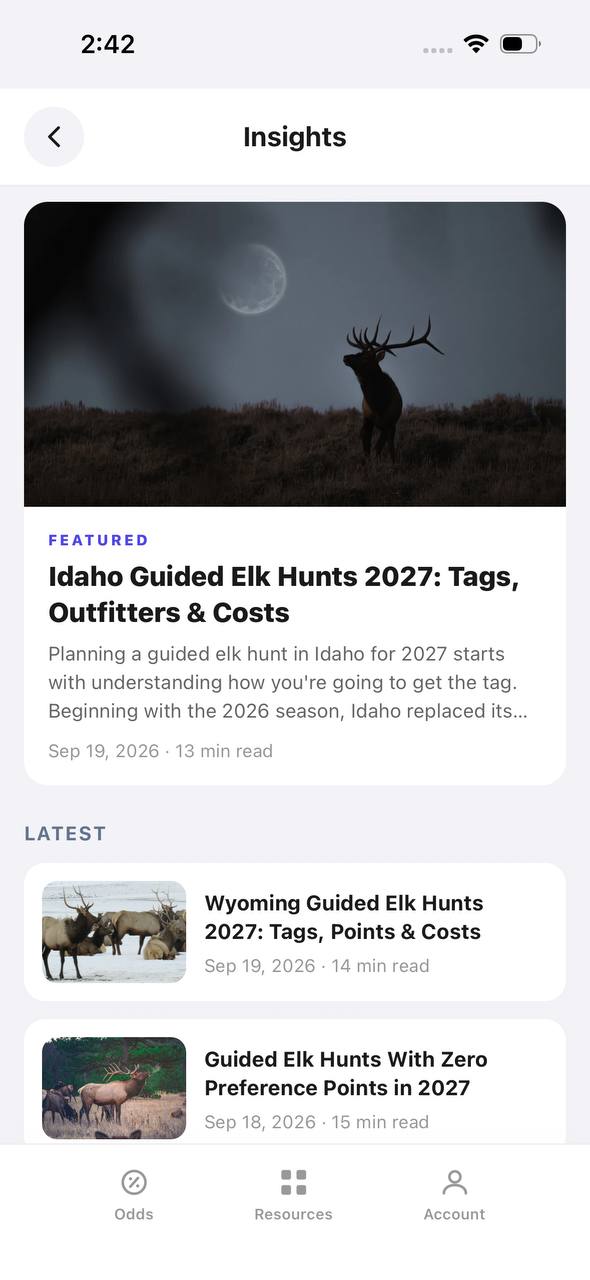
Insights screen with a featured article and a latest articles list

Insights

Hunting articles, built into the app itself.

Insights opens to a featured article with a hero image, then a Latest list of recent posts, each with a thumbnail, read time, and publish date.

  • The featured slot rotates to the newest deep-dive article.
  • Read time and publish date show on every card, not just the featured one.
  • This mirrors the blog content already published on the marketing site.
Download on the App StoreGet it on Google Play

How TAGZ Simplifies Mobile Hunt Planning

When I’m picking units or prepping backup areas, TAGZ makes it easy to compare draw odds, access, and pressure points. I build a hunt plan with multiple options, so if Plan A is a bust, I’m not wasting time wondering where to go next. It’s the simplest way to stay flexible, and it cuts down on guesswork when you’re burning daylight.


FAQ: Mobile Hunting Strategy in the West

Q: How far should I move if I’m not seeing animals? A: Sometimes just over the next ridge gets you away from pressure. Other times, you may need to drive an hour or more and start over. Trust sign and your gut.

Q: Isn’t mobile hunting tough in big wilderness areas? A: It can be, but you can still move camp within a basin or jump trailheads. The key is not camping on top of other hunters.

Q: What’s the biggest mistake hunters make? A: Getting stuck in one spot and hoping things will change. Animals respond to pressure—so should you.

Q: How do I scout for a mobile hunt? A: Build several backup plans using tools like TAGZ. Mark access points, glassing spots, and possible camps before you ever leave home.


If you want to dig deeper on picking backup units or understanding pressure, check out our guides on choosing backup units and reading hunting pressure.